DNS Lookup
Use our DNS lookup tool to quickly find A, AAAA, CNAME, MX, NS, TXT, SOA DNS records of any host and get detailed information.

DNS Lookup is a free tool that finds A, AAAA, CNAME, MX, NS, TXT, SOA and CAA records for a host and displays their DNS values.
What does a DNS lookup check?
A DNS lookup checks the records published for a domain name or host. The Domain Name System, usually shortened to DNS, connects readable names such as www.example.com to addresses and configuration data used by browsers, mail servers and other internet services.
Different record types answer different questions. An A record contains an IPv4 address, while an AAAA record contains an IPv6 address. A CNAME points one hostname to another. MX records route email, NS records identify authoritative nameservers, TXT records publish text-based policies or verification values, and the SOA record contains administrative and timing information for the DNS zone.
The lookup runs on the server using the host you provide. Your Host input is sent to the server over HTTPS and is not stored. The result describes only the returned A, AAAA, CNAME, MX, NS, TXT, SOA and CAA records and their fields. It does not test whether a website responds, whether an email server accepts messages or whether a TLS certificate is valid.
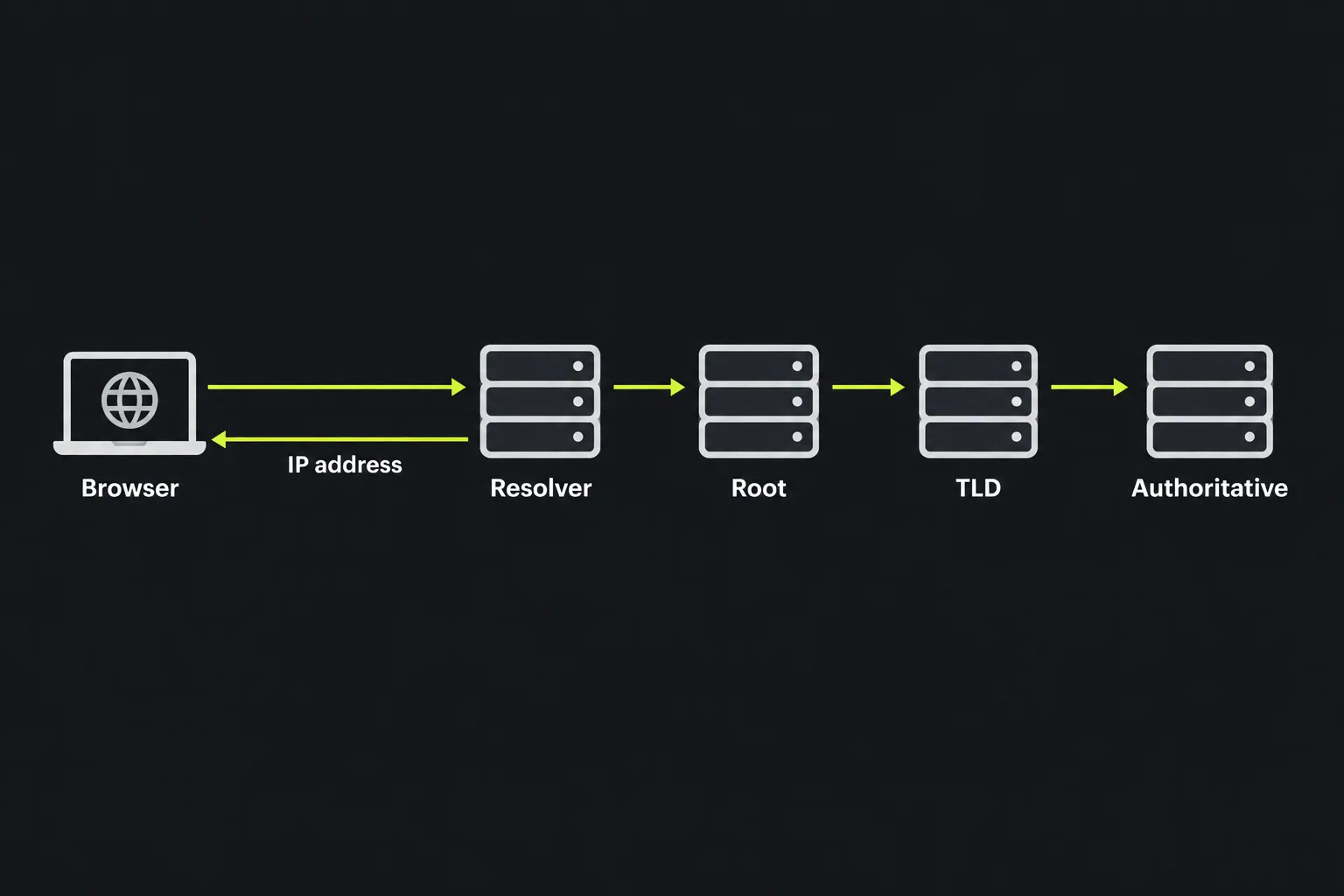
How do I use DNS Lookup?
Enter the hostname you want to investigate in the Host field and run the lookup.
- Use the exact hostname affected by the problem, such as www.example.com or mail.example.com. Records for a subdomain can differ from those for the main domain.
- Use a bare hostname instead of a full page address that contains a path, query string or fragment.
- Compare the returned addresses, targets and nameservers with the values provided by your hosting, email or DNS provider.
- Check the TTL before assuming an older result indicates a configuration error. A resolver may still have a previous value cached.

DNS names are case-insensitive, so WWW.EXAMPLE.COM and www.example.com refer to the same name. Spaces are not valid within an ordinary hostname. Internationalized domain names that contain accented or non-Latin characters use ASCII A-labels in DNS. The encoded portion of an A-label uses Punycode, while the Unicode form is a U-label, so use the A-label form if the Unicode version does not resolve as expected.
Each DNS label is limited to 63 octets, and complete domain names also have a protocol length limit. Very long input may therefore be invalid even if its individual characters appear acceptable. Numbers and hyphens are allowed in many hostname positions, but under the usual hostname rules, a label cannot begin or end with a hyphen.
How do I read the DNS lookup result?
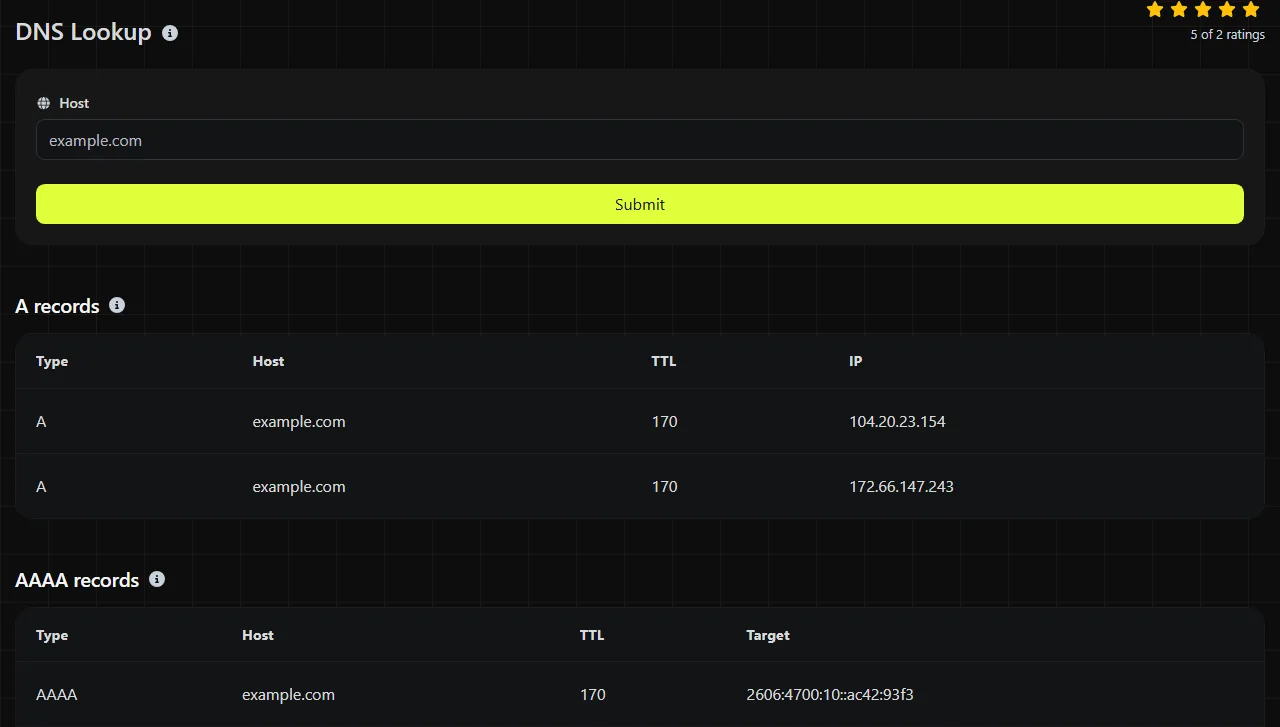
Read each field in the context of its record type because several fields apply only to MX, SOA, TXT or other specific records.
- Host identifies the name that the returned record belongs to.
- TTL is the time to live in seconds. It tells DNS resolvers how long they may cache that record.
- Target contains the destination or address associated with records that return a target.
- IPv6 contains the address returned by an AAAA record.
- Priority is used by MX records. A lower number takes precedence over a higher number.
- Entries contains individual text strings provided by a record, commonly when text is divided into separate parts.
- MNAME is the primary nameserver specified in an SOA record.
- RNAME is the SOA contact address in DNS notation, with the first unescaped period representing the usual at sign.
- Serial is the zone version number. Authoritative servers use it to recognize updated zone data.
- Refresh tells secondary nameservers how often to check for a newer zone version.
- Retry tells a secondary server when to try again after a failed refresh.
- Expire sets how long a secondary server may continue using zone data when it cannot contact the primary server.
- Min. TTL is the SOA MINIMUM field. It is not a general minimum TTL. Together with the SOA record's TTL, it is used to determine the TTL for caching negative answers, such as a name that does not exist.
- Flags, Tag and Value are structured fields used by policy records such as CAA when present.
- Nameserver identifies a server specified by an NS record.
DNS Lookup displays fields based on the record type, so blank or missing fields can be expected. For example, an A record has no MX priority, and an MX record does not need an IPv6 field.
Practical DNS troubleshooting scenarios
A DNS lookup is useful when the issue points to a naming or routing problem. The example hostnames and record values in the scenarios below are hypothetical, not live DNS data.
A website does not resolve. Look up www.example.com and review its A, AAAA and CNAME data. A plausible result might show a CNAME target of hosting.example.net, or an A target in IPv4 dotted-decimal form. If the returned target belongs to an old hosting service, update the relevant record with the authoritative DNS provider.
Email does not arrive. Look up the main domain and review its MX records. A hypothetical result could contain priority 10 with target mail.example.com and priority 20 with a backup mail host. Confirm that the targets match the mail provider's settings. The lookup cannot show whether a mailbox exists, whether the receiving server rejected a message or whether it entered a spam folder.
A certificate warning appears after a hosting change. Check the A, AAAA and CNAME records for the exact hostname shown in the browser. If DNS still directs some visitors to the previous server, they may receive that server's certificate. DNS Lookup does not inspect the certificate itself, so use a certificate checker after confirming that the host points to the intended service.
Why isn't my DNS change visible yet?
A correct DNS change may not appear immediately because recursive resolvers can retain the previous answer until its TTL expires. This delay is often called DNS propagation, although it usually reflects caches expiring at different times rather than records physically traveling across the internet.
The TTL shown on a new record does not necessarily indicate how long the old record will remain cached. The resolver may have stored the previous value using its previous TTL. Failed lookups can also be cached, so a newly created hostname may continue to appear missing for a while.
Check the NS records to confirm that the domain uses the nameservers where you made the change. If the nameservers are wrong, waiting will not fix the issue. For a more detailed comparison, command-line tools such as dig or nslookup can query a specific recursive or authoritative server directly.
Frequently asked questions
Can I enter an IP address instead of a hostname?
A forward DNS lookup is intended to find records associated with a hostname. To find a hostname published for an IP address, use Reverse IP Lookup, which checks reverse DNS data. Keep in mind that many IP addresses have no useful reverse record, and one reverse name does not list every website hosted on that address.
Why can a CNAME conflict with other records?
A CNAME makes one DNS name an alias of another and generally cannot coexist at that same name with other ordinary record data. This is why the zone apex, such as example.com, usually uses A or AAAA records instead of a conventional CNAME. Some DNS providers implement proprietary flattening or alias records, but these are provider-specific features rather than standard CNAME behavior.
Can public DNS show records from an internal company network?
Usually not. Organizations can use split-horizon DNS, where internal users receive different answers from those available publicly. Because this lookup runs on the server, its result reflects DNS visible from that server rather than records available only through your office network or VPN.
Does this lookup validate DNSSEC?
No DNSSEC validation status is included in the listed result fields. A domain can return ordinary DNS records even when its DNSSEC chain has a signing or delegation error. Use a dedicated DNSSEC validator or a command-line query that requests DNSSEC data when investigating this type of failure.
Similar Tools
Use the reverse IP lookup tool to find the domain or host associated with any IP address quickly and easily.
Digily Link's IP lookup tool provides detailed information about any IP address. Use this free online service to get comprehensive IP data.
Use our SSL lookup tool to retrieve comprehensive details about any SSL certificate and ensure your website's security.
Popular Tools
Create your own custom signature and download it easily with our signature generator tool for personalized e-signatures.
Calculate the size of any text in Bytes (B), Kilobytes (KB), or Megabytes (MB) using our text size calculator tool.
Use the reverse IP lookup tool to find the domain or host associated with any IP address quickly and easily.
Use our ping tool to check the status and response time of any website, server, or port quickly and efficiently.
Generate your free WhatsApp link instantly with our WhatsApp Link Generator. Add a custom message and start chats in one click. No login or coding required.
Digily Link's IP lookup tool provides detailed information about any IP address. Use this free online service to get comprehensive IP data.