PNG to JPG
Convert PNG image files to JPG format easily with our PNG to JPG converter tool for versatile image usage.
PNG to JPG is a free tool that converts a PNG image file to JPG entirely in your browser.
How do I convert a PNG file to JPG?
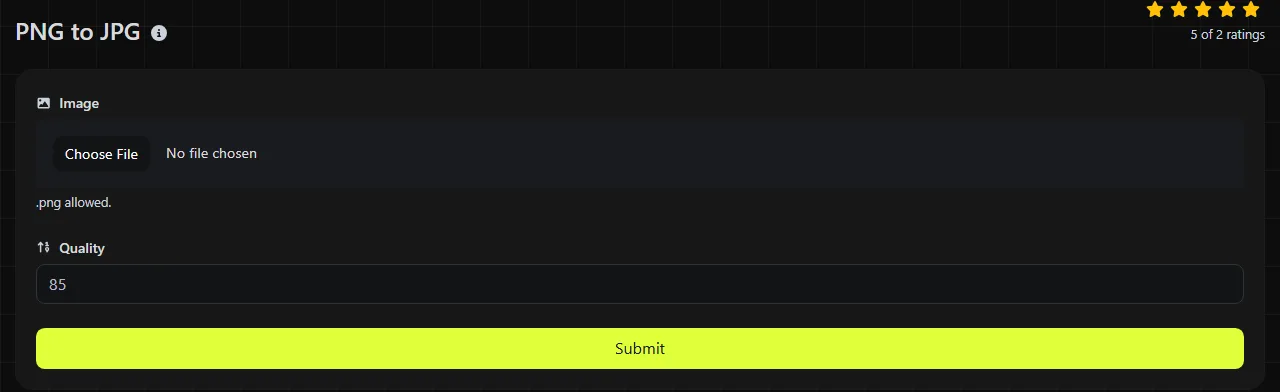
Select the PNG file you want to convert, let your browser process it, then save the resulting JPG file. The conversion happens entirely in your browser. Your image is never uploaded to a server.
- Choose the PNG image you want to convert to JPG.
- Run the conversion and save the JPG output.
- Open the saved JPG and check how previously transparent areas and fine details look, then compare its file size with the original PNG.
Keep the source PNG until you have checked the JPG for compression artifacts and lost transparency. JPG compression discards image data, so converting the JPG back to PNG later will not restore the original quality or transparency.
What changes when PNG is converted to JPG?
The image changes from a lossless PNG representation to a lossy JPEG representation, and any alpha transparency can no longer be stored. The main differences are:
- Compression: PNG uses lossless compression, which preserves the stored pixel data. JPG uses lossy compression and removes some visual information to reduce file size.
- Transparency: PNG can contain fully or partially transparent pixels. JPG has no alpha channel, so the converted file cannot remain transparent. The converter's published behavior does not specify which color it uses to replace transparent areas, so inspect the result.
- Animation: Standard PNG files are static, although animated PNG files, known as APNGs, also exist. JPG is a static format and cannot retain animation. This tool does not state how it handles an APNG or which frame it would use.
- Visual detail: JPEG artifacts may appear around text, icons, sharp edges, and blocks of flat color. They are usually less noticeable in photographs and images with gradual tonal changes.
- Support: Both formats work in mainstream browsers and common desktop and mobile software. JPG is also widely accepted by document systems, email services, photo-printing services, and sites that do not accept PNG uploads.
Will the JPG file be smaller than the PNG?
The JPG will often be smaller when the source is a photograph, but a smaller file is not guaranteed. The result depends on the image dimensions, its content, the PNG's existing compression, and the JPEG encoding settings used during conversion.
A large PNG photograph normally gives JPG more room to reduce the file size because photographic noise and subtle color changes are expensive for lossless compression. A small diagram, logo, or interface icon may already compress efficiently as a PNG. Converting that type of image may produce only modest savings while adding visible ringing or blurred color around edges.
Do not estimate the output size by changing the extension or comparing two unrelated images. Save the converted JPG and compare its actual size with the source PNG in File Explorer on Windows, Finder on macOS, or the file information view on your phone. If web performance is your goal, inspect the converted JPG for JPEG artifacts in addition to comparing the number of kilobytes. The Image optimizer may help when you need to reduce a file without changing its basic use.
When should I convert PNG to JPG?
Convert PNG to JPG when broad JPG compatibility or a smaller photographic file matters more than lossless pixels and transparency. Common examples include adding a screenshot to a system that accepts only JPG, sending a large photo by email, or preparing an opaque image for a photo-printing service.
Keep PNG when the image contains transparency, pixel art, a QR code, small text, a line drawing, or a logo with hard edges. Lossy compression can make these elements less distinct. PNG is also the safer working format when the file will undergo further editing and repeated exports.
Conversion is not a repair method. If the PNG was created from a low-quality JPG, saving it as JPG again introduces another lossy encoding stage. The PNG encoding may have preserved the decoded, already damaged raster pixels losslessly, but it cannot contain detail that was lost before the PNG was created.
For a website, JPG remains suitable for ordinary opaque photographs. If you need modern web compression or transparency, compare the result with PNG to WebP instead. The need for PNG transparency or JPG compatibility should determine the format, not file size alone.
Examples and tricky source files
These examples show what happens when PNG input is encoded as JPEG. Exact JPG byte sizes and quality levels cannot be predicted from the PNG filename.
- Input: product-photo.png, containing an opaque photograph. Output: a JPG-encoded image. It will commonly be smaller, although the savings cannot be known until it is converted.
- Input: logo.png, containing transparent pixels. Output: a JPG with no transparency. Check the previously transparent area before using it on a colored page.
- Input: animated-banner.png in APNG form. Output constraint: JPG cannot contain the animation. Do not use this conversion when motion must be preserved.
Spaces, punctuation, numbers, and accented characters in a filename do not affect the PNG or JPEG encoding itself, although a particular website or operating system may rename the downloaded file.
Preservation of PNG text chunks and EXIF fields in the converted JPG is not specified, so check them separately if they matter to your workflow.
Frequently asked questions
Are JPG and JPEG different formats?
No. JPG and JPEG refer to the same image format. The three-letter .jpg extension became common on systems that historically restricted filename extensions, while .jpeg is the longer form.
Can I make a JPG by renaming .png to .jpg?
No. Renaming changes only the filename, not the encoded image data. Software that checks the file signature will still identify it as PNG, and some upload forms will reject the mismatch.
Why does small text look blurry after conversion?
JPEG compression is designed mainly for continuous-tone images such as photographs. The way it handles color detail can soften colored text and create artifacts next to high-contrast edges. Keep the PNG for diagrams, interface screenshots, and text-heavy graphics.
Will the converted JPG keep location or camera information?
Do not assume that PNG text chunks, EXIF fields, or other metadata will be copied to the JPG. Metadata handling is not specified for this converter. Check the saved file with your operating system's properties panel or a suitable metadata reader before relying on it.
Is browser-based conversion safe for confidential images?
The image is processed in your browser and is never uploaded to a server by this tool.
Final checks
Open the saved JPG at full size and inspect text, edges, gradients, and every area that was transparent. Confirm that the receiving website or application accepts JPG, compare the file size with the original PNG, and keep the source file if you may need transparency or further editing later.
Similar Tools
Convert PNG image files to WebP format easily with our PNG to WebP converter tool for efficient image compression.
Convert PNG image files to BMP format easily with our PNG to BMP converter tool for high-quality image outputs.
Easily convert PNG image files to GIF format with our PNG to GIF converter tool for animated images.
Popular Tools
Create your own custom signature and download it easily with our signature generator tool for personalized e-signatures.
Calculate the size of any text in Bytes (B), Kilobytes (KB), or Megabytes (MB) using our text size calculator tool.
Use the reverse IP lookup tool to find the domain or host associated with any IP address quickly and easily.
Use our ping tool to check the status and response time of any website, server, or port quickly and efficiently.
Generate your free WhatsApp link instantly with our WhatsApp Link Generator. Add a custom message and start chats in one click. No login or coding required.
Digily Link's IP lookup tool provides detailed information about any IP address. Use this free online service to get comprehensive IP data.