Email extractor
Use our email extractor tool to easily extract email addresses from any text content and manage your contacts efficiently.
Email extractor is a free tool that finds email addresses in text and reports how many matches it found.
How do I extract email addresses from text?
Paste or enter the source text, run the extraction, then review the returned addresses and the Count value.
- Copy the text containing the email addresses.
- Check the matches before copying them into a spreadsheet, contact system, or mailing platform.
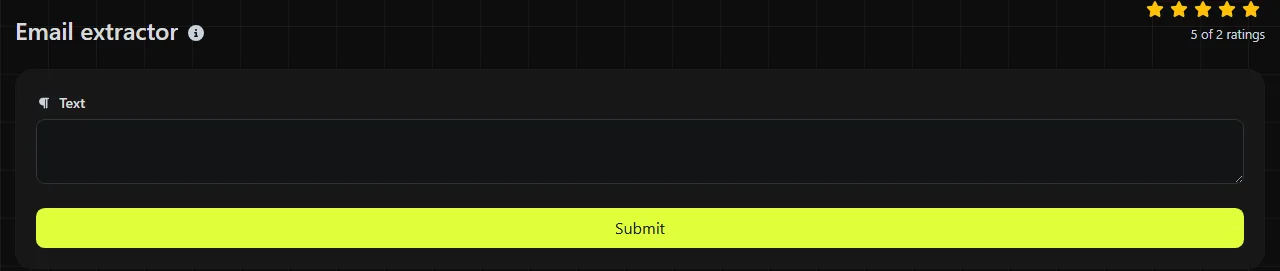
For example, the input "Accounts accounts@example.com, support support@example.co.uk" contains two conventional email addresses. The extracted list should contain accounts@example.com and support@example.co.uk, with a count of 2.
Keep an untouched copy of the source text until you have checked the extracted email addresses. If an address looks incomplete, the original line often shows whether punctuation, a line break, or formatting caused the problem.
Where does an email extractor save time?
It saves time when addresses are mixed with names, notes, log entries, or other text that you would otherwise have to search line by line.
- Excel and Google Sheets exports may contain names, phone numbers, and email addresses in the same notes column. Extract the addresses before preparing a separate email column.
- Microsoft Word mail merge requires a suitably structured data source and, for email merges, a field containing recipient addresses. Extraction can help turn copied correspondence or registration notes into a list for review.
- Gmail and Outlook message headers can contain several addresses among display names and routing details. Paste only the relevant header text instead of an entire sensitive conversation.
- WordPress form exports sometimes include labels and free-text answers around contact details. Extraction isolates address-shaped strings before you import them elsewhere.
- Support and server logs may contain addresses within longer entries. Review the context afterward because logs can include test accounts and automated senders.
If the same address appears on multiple lines, use Duplicate lines remover after arranging the extracted results one per line. Text separator may help when a destination system requires commas or another delimiter.
How should I interpret the result?
The Count field shows how many email address matches the extraction returned. It does not establish that every address belongs to a different person, is currently active, or can receive mail.
Extraction uses pattern matching, not mailbox verification. A correctly formed address may refer to a closed account, a mistyped domain, or a nonexistent mailbox. Conversely, unusual but valid email syntax may fall outside the regular expression used by a simple extractor.
Tricky input and false matches
Email addresses commonly appear next to brackets, commas, and periods. A matching pattern normally aims to identify the address rather than the surrounding text, but you should still inspect the punctuation at the beginning and end of each result.
Numbers are valid in many parts of an address, and plus addressing such as name+receipts@example.com is widely used. Accented characters, internationalized domain names, quoted local parts, and other less common forms require more careful handling. Support for them depends on the exact matching pattern, so do not assume every technically valid address will be recognized.
Obfuscated text such as "name at example dot com" is not a literal email address and may not match. Addresses split across line breaks can also be missed. You can check very long input in smaller sections when you need to trace each extracted email match back to its source.
Is my text sent to a server?
Yes, the processing takes place on the server. Your input travels to the server over HTTPS and is not stored.
Email addresses can be personal data, and the source text may also contain names, account details, or private messages unrelated to the extraction task.
Frequently asked questions
Can I extract email addresses from HTML source?
You can paste HTML as text, and literal addresses may appear in content or mailto values. An address written with HTML entities, generated by JavaScript, or deliberately concealed may not exist as one continuous match.
Does an extracted address mean I can add it to a marketing list?
No. Finding an address does not provide consent or another lawful basis for using it. Check the UK GDPR and Privacy and Electronic Communications Regulations requirements that apply to your purpose and recipient type.
Should I convert email addresses to lowercase?
Domain names are case-insensitive, but the part before the @ sign is technically allowed to be case-sensitive. Standards require the case of the part before the @ sign to be preserved, so automatically changing every address is not guaranteed to be safe. Preserve the original form unless the receiving system has a documented normalization rule.
Why was an international email address missed?
International email addresses can contain Unicode characters or an internationalized domain. Many extraction patterns focus on familiar ASCII forms. When appropriate, using an internationalized domain's IDNA A-label form may make the domain easier to process in systems with limited Unicode support.
Final checks
Remove duplicate extracted email addresses, compare a sample of the extracted addresses with the original text, and check the destination system's required email address format. Before sending mail, confirm that each address is relevant, lawfully obtained, and suitable for the intended message.
Popular Tools
Create your own custom signature and download it easily with our signature generator tool for personalized e-signatures.
Calculate the size of any text in Bytes (B), Kilobytes (KB), or Megabytes (MB) using our text size calculator tool.
Use the reverse IP lookup tool to find the domain or host associated with any IP address quickly and easily.
Use our ping tool to check the status and response time of any website, server, or port quickly and efficiently.
Generate your free WhatsApp link instantly with our WhatsApp Link Generator. Add a custom message and start chats in one click. No login or coding required.
Digily Link's IP lookup tool provides detailed information about any IP address. Use this free online service to get comprehensive IP data.