IP Lookup

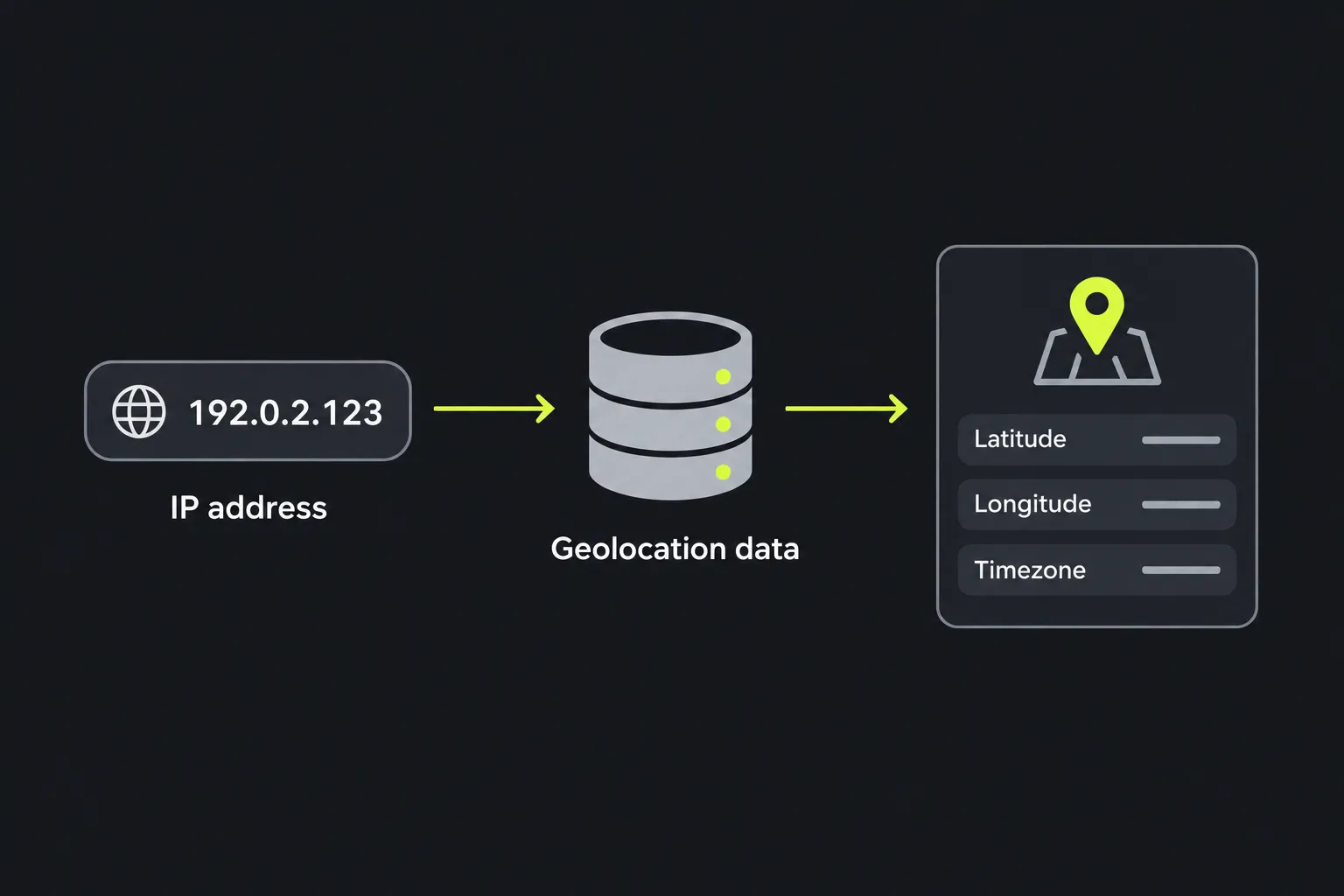
IP Lookup is a free tool that returns the latitude, longitude and timezone associated with an IP address.
What does an IP lookup actually check?
An IP lookup compares an IP address with geolocation data that associates blocks of internet addresses with approximate places and timezones. It does not obtain GPS coordinates from the device using that address.
Internet Protocol addresses identify network interfaces so that traffic can be routed across networks. An IPv4 address is a 32-bit address conventionally written in dotted-decimal notation, such as 192.0.2.10, while an IPv6 address is a 128-bit address written in colon-separated hexadecimal notation, with compression permitted. The address itself does not contain a country, latitude or timezone. Those details come from external datasets built from address registrations, routing information and other network records.
The returned coordinates normally represent an estimated location for the address block, an internet provider or a network gateway. They may refer to a nearby city, a data centre or an administrative location rather than the physical position of a particular computer or phone.
How do I use IP Lookup?
Supply the public IP address you want to investigate, then read the three returned fields together rather than treating any one value as exact. IP Lookup runs on the server. The entered IP address travels to the server over HTTPS and is not stored.
Use a bare IP address where possible. Text copied from logs, email headers or monitoring systems may contain extra characters that are not part of the address:
- Remove a port number, so 203.0.113.20:443 becomes 203.0.113.20.
- Do not enter an IPv4 prefix in CIDR notation such as 203.0.113.0/24 when you mean to check one address.
- For IPv6, remove surrounding square brackets used in URLs, such as those in [2001:db8::1].
- Do not substitute a domain name, accented text or other words for an IP address. Use DNS Lookup first if all you have is a hostname.
Numbers and punctuation are meaningful only when they form valid IPv4 or IPv6 syntax. Empty input, very long pasted text and log lines containing several addresses do not identify one IP to check. Private addresses such as 192.168.1.10, 10.0.0.5 and loopback addresses are used inside local systems and do not have a useful public geolocation.
How do I read the IP lookup result?
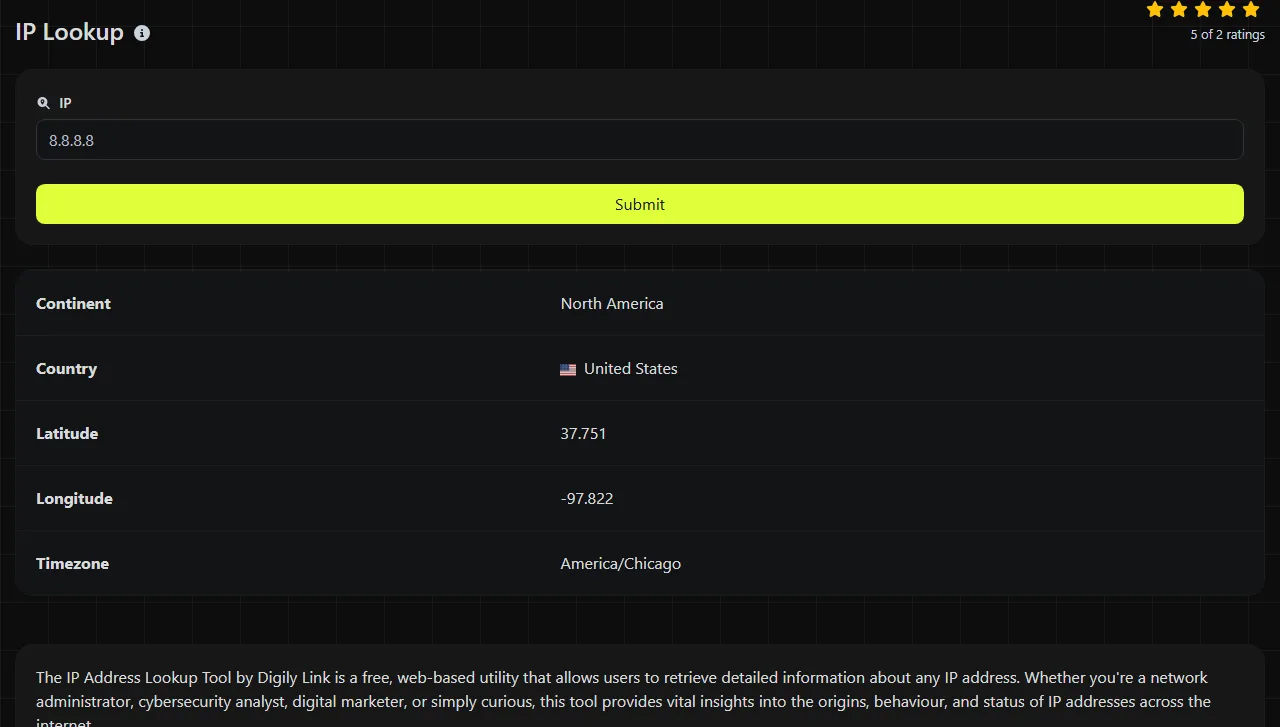
Read the result as an approximate geographic association for the IP address, with a timezone that helps interpret local time at that location. The fields mean the following:
| Result field | What it tells you |
|---|---|
| Latitude | The estimated north-south coordinate associated with the IP address. Positive values are north of the equator and negative values are south. |
| Longitude | The estimated east-west coordinate. Positive values are east of the prime meridian and negative values are west. |
| Timezone | The timezone associated with the estimated location. It provides local-time context but does not prove where the user or device is physically located. |
A typical result therefore has the form Latitude: decimal coordinate, Longitude: decimal coordinate and Timezone: timezone value. Extra decimal places do not necessarily indicate street-level accuracy. Geolocation databases may store a representative coordinate with more precision than the source data can support.
Timezone boundaries also require care. A coordinate near a boundary may be associated with a neighbouring timezone, and daylight-saving rules can change the applicable UTC offset during the year. Use the timezone field as context for log timestamps or service schedules, not as proof of a device's clock setting.
Troubleshooting with an IP lookup
An IP lookup is useful when a network symptom may depend on the geographic or timezone association of the address involved. Common checks include:
- A site is reaching the wrong region. Resolve the hostname with DNS Lookup, then check the returned public IP. Coordinates in an unexpected region may indicate an old DNS answer, a content delivery network routing choice or a geolocation database mismatch.
- A DNS change does not appear to be live. Compare the IP returned by your resolver with the address you intended to publish. IP Lookup can provide geographic context for each address, but it cannot confirm the DNS record itself. Resolver caches may continue to return the previous address until its time to live expires.
- Email follows an unfamiliar route. Extract a public relay IP carefully from the message headers and look it up. This may provide approximate geographic context for the route, although the relay's location is not necessarily the sender's location.

For a certificate warning, first confirm that the hostname resolves to the expected IP, then use SSL Lookup to inspect the certificate. The coordinates and timezone returned here cannot show whether a certificate is valid, expired or issued for the correct hostname.
Why can an IP location appear wrong?
An IP location can appear wrong because geolocation is an estimate and address blocks move between providers, networks and regions. A broadband customer may also share an outward-facing address with other customers, while mobile traffic may leave the provider's network far from the handset.
VPNs, corporate gateways and proxy services expose the public address of their exit server. The result then describes that server's associated location, not the person using it. Satellite networks and large cloud platforms can produce a similar gap between the user and the visible network endpoint.
Caching can create another mismatch. DNS resolvers, browsers and operating systems may retain an old hostname-to-address answer after a DNS update. Geolocation providers also refresh their datasets on their own schedules, so a newly transferred IP block may still carry its previous coordinates or timezone. DNS propagation and geolocation database updates are separate processes, and waiting for one does not guarantee that the other has completed.
Frequently asked questions
Can an IP address reveal an exact home address?
No. IP geolocation does not normally reveal a house, flat or precise device position. An organisation with relevant records may be able to associate an address with a person or account at a particular time, subject to its records and the applicable legal process.
Will a VPN change the lookup result?
Only if you choose to look up the VPN exit server's IP rather than the device's ordinary public address. Different VPN server locations can therefore produce different coordinates and timezones even when the device has not moved.
Why does the same person have a different IP later?
Many residential and mobile connections use dynamically assigned addresses that can change after a reconnect, router restart or provider-side update. Carrier-grade network address translation can also make many devices share one public IPv4 address.
Are IP addresses personal data in the UK?
An IP address can be personal data under UK data protection law when it relates to an identifiable person or can be combined with other information to identify them. Avoid publishing addresses from private logs without a clear reason, and follow your organisation's retention and access policies.
Can latitude and longitude be pasted into a map?
Yes, most mapping services accept decimal latitude and longitude as a coordinate pair, usually with latitude first. Treat the resulting pin as the database's estimated reference point, not the confirmed position of the IP user.
Final checks
Confirm that you copied one public IP address without a port, subnet suffix or surrounding URL punctuation. If the result conflicts with what you expected, check the current DNS answer, allow for resolver caching, and compare evidence from server logs or service configuration before acting on the estimated location.
Similar Tools
Use the reverse IP lookup tool to find the domain or host associated with any IP address quickly and easily.
Use our DNS lookup tool to quickly find A, AAAA, CNAME, MX, NS, TXT, SOA DNS records of any host and get detailed information.
Use our SSL lookup tool to retrieve comprehensive details about any SSL certificate and ensure your website's security.
Popular Tools
Create your own custom signature and download it easily with our signature generator tool for personalized e-signatures.
Calculate the size of any text in Bytes (B), Kilobytes (KB), or Megabytes (MB) using our text size calculator tool.
Use the reverse IP lookup tool to find the domain or host associated with any IP address quickly and easily.
Use our ping tool to check the status and response time of any website, server, or port quickly and efficiently.
Digily Link's IP lookup tool provides detailed information about any IP address. Use this free online service to get comprehensive IP data.
Generate your free WhatsApp link instantly with our WhatsApp Link Generator. Add a custom message and start chats in one click. No login or coding required.