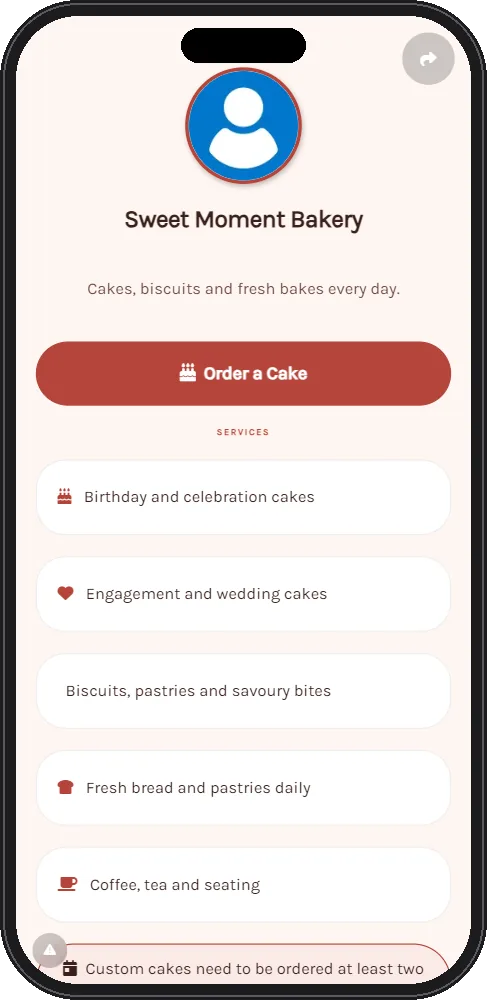
Instagram profile
CB
214posts12.4Kfollowers
Mola CoffeeSpeciality coffee, Bristol
digily.link/molacoffeeFollowMessage
Add it to the links section on the Edit profile screen and it appears right below your bio.
Create free links, shorten your links, build your bio link page and generate your QR code. All in one dashboard, in 26 languages, run by a UK company.
Create links for free, shorten long links, manage your bio link page and QR codes in one place, and measure clicks.
 QR menuNewDigital menus for cafés and restaurants
 Bio linkAll your links on one page
 Link shortenerShort, branded, trackable links
 QR codeDynamic, customisable QR codes
 AI website and HTML hostingSites from a prompt, free hosting
 Link analyticsVisitors, sources, devices and UTM
 Digital business cardSave to contacts in one tap
 Domains14 short, memorable domains
 Free tools126 tools, no sign-up needed
 Appointment schedulerLet customers book appointments from your bio link page
 Form builderApplication, survey and contact forms
 Customer Tracking (CRM)Customer list, stage and task tracking
 QuotesNumbered quotes, approved via a link
 Digital CatalogueOnline catalogue from a PDF or your products
 Influencer DirectoryCreators by city and category
Put your bio link in the link field on your profiles. No website? Add it to the website field and your page stands in for a site.
Add it to the links section on the Edit profile screen and it appears right below your bio.
Add it to the website field in your WhatsApp Business profile and customers chatting with you reach your page in one tap.
Add it to the links on the channel customisation screen and it shows as the first link in your channel header.
Add it to the website field on your profile and everyone who watches your videos can reach all your links.
Add it to the website field in your business details and you get a website button on Maps and in Search.
No website? Your bio link page stands in for one. Share a single address on business cards, posters and adverts.
A song or video tapped on Instagram opens straight in the app, not the browser. Your listeners don't have to bother logging in. Listening and subscribing are just one tap away.
From sign-up to first click, it's all in one dashboard. No code, no designer, no waiting.
Pick a template or describe it to the AI. Add your links, then choose your colours and font.
Put your address on your Instagram, TikTok and WhatsApp profiles. Your short link and QR code are ready too.
See who visited, where from and on which device. Know what works and grow your page around it.
Country, city, device, browser, source and UTM. Twelve reports, in real time.
Appointments, form responses and orders from your bio link page come together in your customer list. Prepare your quotes and catalogue in the same place and send them as a link.
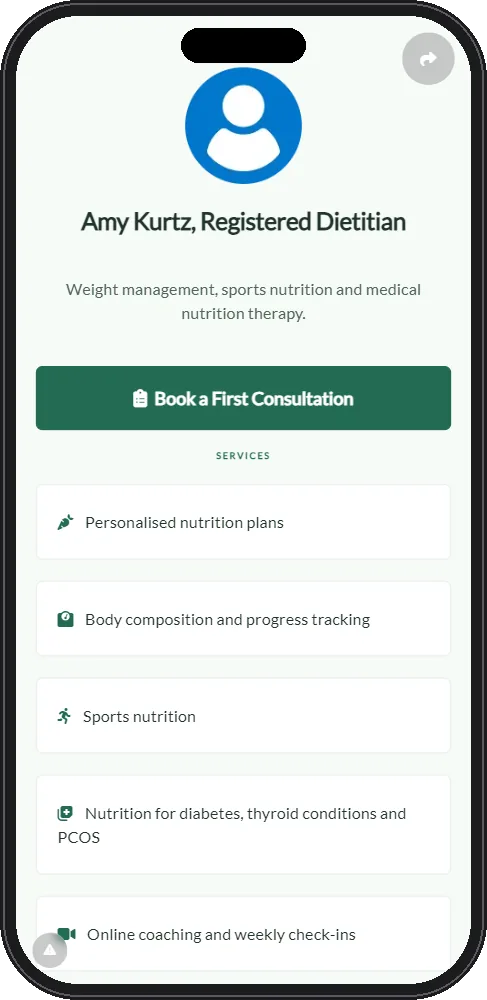
Add your services, working hours and staff. Your customer picks a free time slot on your bio link page on Instagram and confirms the booking with a code sent to their phone. You don't need a separate site for an online booking system.
20 appointments a month on the free plan
See the Appointment scheduler page Build contact, application, quote and appointment request forms with drag and drop. Add the form to your bio link page, see responses in the dashboard and get notified of new ones.
Included in the free plan
See the Form builder page Everyone who reaches you through a form, an order or a booking on your bio link page lands in your customer list automatically. Follow each person through stages and add notes and tasks. No separate CRM to set up.
On Pro and higher plans
See the Customer Tracking (CRM) page Pick items from your products and services and let discounts and the VAT breakdown be calculated for you. Send the quote on WhatsApp or by email, your customer opens and accepts it on their phone. No Word or Excel templates needed.
On Pro and higher plans
See the Quotes page Upload your ready PDF catalogue or build an online catalogue from your products. It is published at a short address and shared with a QR code and your bio link page. When a price changes, the product catalogue updates itself.
On Pro and higher plans
See the Digital Catalogue page Pick a template, add your links and share with a domain that suits your industry.
Brands find creators by city, category, platform and follower range. Creators apply with their bio link page and are listed in the directory once approved.
Make your background a solid colour, gradient, image or video. Choose your font and button style to match your brand.
A short domain that says what you do is yours at no extra cost. Run by a UK company, covered by UK GDPR, priced in pounds.
Customers know what you do the moment they see your address. digily.shop for a shop, digily.dev for a developer, ukbio.link for a UK bio.
Your data is handled under UK GDPR and the Data Protection Act 2018 by an ICO-registered company.
The interface comes in 26 languages. Reach us by WhatsApp or email.
Plans are priced in GBP. Pay by card via Stripe or with PayPal.
Connect advertising and analytics platforms and track your conversions.
Shorten links without leaving your browser. Right-click, shortcuts and recent links.
No adverts on any plan. See the full comparison on the plans page.
Business tools are included on Pro and higher plans. Customer Tracking (CRM), Quotes and Digital Catalogue.
Filter by topic. Can't find what you need? Write to us and we'll get back to you.
A link in bio is the single clickable address you are allowed to put in a social media profile. Instagram, TikTok and YouTube each give you one, and that one link has to cover your shop, your latest release, your newsletter and everything else.
A link in bio page solves that. Instead of swapping the link every time something changes, you point it at a page you control and edit the page. Everyone who already saved or shared your address keeps seeing the current version, and nothing has to be announced twice.
Open Instagram, tap your profile picture, then Edit profile and Links. Choose Add external link, paste your Digily Link address and save. It appears under your bio text straight away.
Instagram now lets you add up to five links directly, which helps but does not go far. Those five cannot be scheduled and cannot hold a file, a product or a contact form. One Digily Link address in that field gives you all of it, and you never have to edit your Instagram profile again.
Yes, and that is rather the point. One address goes in every profile you keep: TikTok, YouTube, X, LinkedIn, Pinterest, Threads, your email signature and anything printed.
Because the page behind the address is yours, a change made once shows up everywhere at the same moment. The statistics also tell you which of those platforms actually sends people who click, which is usually a surprise.
Long web addresses break across lines in messages, get truncated in profiles and give no clue where they lead. Shortening one fixes all three at once.
The part most people miss is what happens afterwards. A short link on Digily Link stays editable, so if the destination moves you change the link rather than reprinting the poster or asking everyone to update their bookmarks. Add your own domain and the short link carries your name instead of a generic shortener's.
It is worth knowing that Google's own shortener, goo.gl, has been retired, so links created there no longer resolve. Anything you shorten is worth keeping on a domain you control.
Yes. The free plan covers a bio link page, short links, QR codes and statistics, and it does not expire or ask for a card.
Paid plans exist for people who outgrow the free limits or want extras such as connecting their own domain, removing branding, higher link counts and longer data retention. Your address stays the same whichever plan you are on, so upgrading never means re-sharing anything.
Creating a QR code is free, and you can download it as PNG for screens or SVG for print at any size.
Use a dynamic code and the destination stays editable after the artwork is printed. That is the difference between a menu, flyer or business card that still works next year and one that quietly stops working the moment a page moves. Every scan is counted too, with location, device and time.
Yes, in real time. You see clicks and scans for the page as a whole and for each individual link on it, plus country, city, device, browser and the site people arrived from.
All of it is collected from the click itself rather than from a tracking cookie, so your visitors are not asked to accept anything before they reach the link they came for.
Digily Link does what a bio link tool does and then keeps going. Alongside the page you get a URL shortener, branded QR codes, file and vCard links, AI or HTML site hosting and analytics, all from one account and one address.
The bigger difference is ownership. You can put the page on a domain you choose, so the recognisable part of the address is yours rather than a platform's, and it moves with you if you ever change tools.
Your data is stored on servers in the United Kingdom and the European Union, and it is never sold or passed to advertisers. Traffic runs over HTTPS and passwords are stored hashed, not in readable form.
Visitor statistics are gathered without tracking cookies and without building profiles of individuals. You can export what you have and delete your account at any time, and full details are set out in the Privacy Notice and the UK GDPR page.
Every account can build links on any of the 15 domain names that come with Digily Link, at no extra cost and with nothing to register. Pick the one that fits what you are sharing, and use a different domain for every link if you want.
If you would rather use a name you already own, a paid plan lets you connect your own domain so your pages sit on it directly. Whichever you pick, the link keeps working when you change what it points to.
No. A bio link page is built by picking a template, dragging your links into the order you want and choosing the colours and fonts. Nothing is typed in code and there is nothing to install.
The same holds if you want a full page rather than a list of links. Describe the site you have in mind and AI writes the HTML, then you refine it by asking for changes in plain words. People who do write code are not shut out either, since you can upload your own HTML, CSS, JavaScript and media as a ZIP and serve it from your domain over HTTPS.
A link in bio page is a short mobile-first hub. It catches people arriving from a social profile and sends them to the one thing they came for. A website is the larger thing behind it, with real pages, longer content and the structure search engines index and rank.
Most people end up wanting both, which is why Digily Link carries both. The bio page handles traffic from Instagram, TikTok and YouTube. When you want proper pages on an address of your own, you can describe a site and let AI write the HTML, or upload your own files, and host it from the same account.
Digily Link, your go-to for bio links and link shortening
Answers are generated by AI and may be wrong. What you write is sent to Anthropic to generate the answer, so do not share personal details. Privacy notice · Talk to a person