User agent parser
Parse user agent strings to extract detailed browser, device, and OS information with our user agent parser tool.
User agent parser is a free tool that reads a user agent string and returns its browser, operating system and device type.
What does a user agent string tell you?
A user agent string is the value of the HTTP User-Agent field. For a web browser, it usually contains product names, version numbers, operating-system tokens and device clues. Command-line clients, crawlers, feed readers and in-app browsers can also send user agent strings.
The format is less orderly than it first appears. Browsers often include compatibility tokens associated with other browsers, so matching the first recognisable product name can produce the wrong result. For example, Chromium-based browsers commonly include both Chrome-related and Safari-related tokens. A parser examines the combination and order of tokens rather than treating the value as a simple list.
User agent data is also self-reported. A client can alter or fabricate it, and some browsers reduce the amount of version and device information they expose. Parsed data is therefore useful for classification and debugging, but it is not proof of a device's identity.
How do I use the user agent parser?
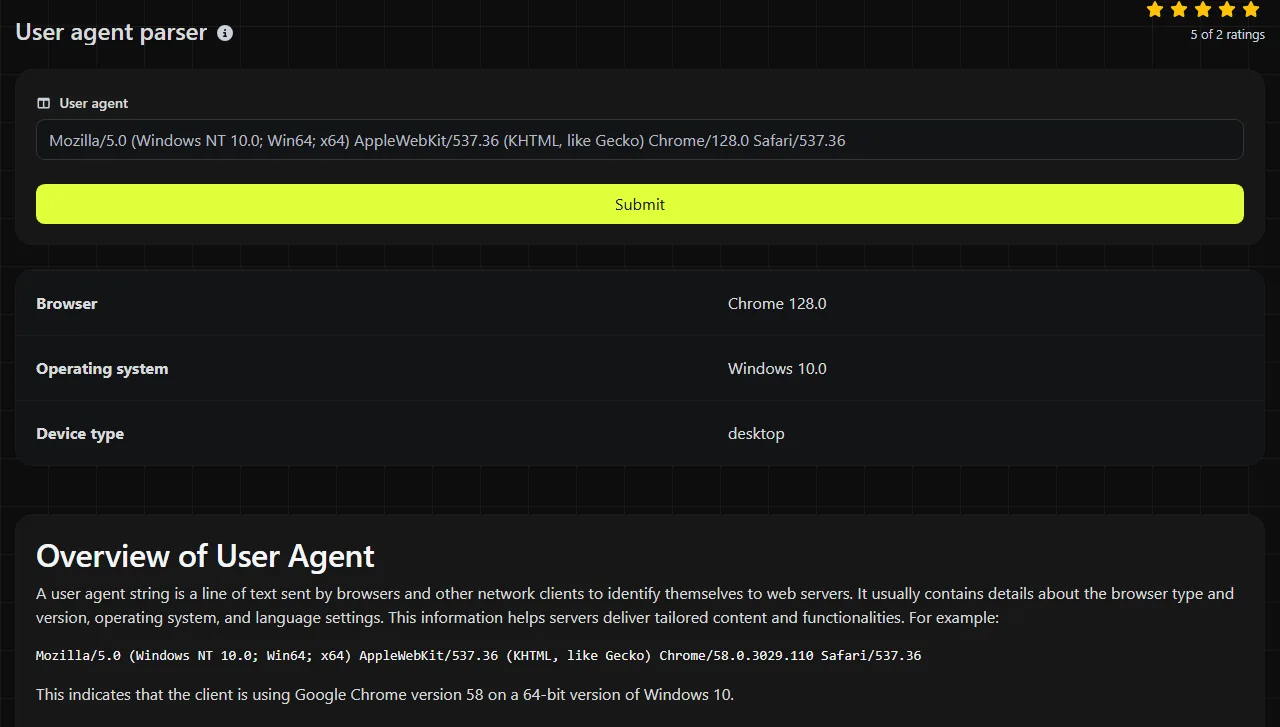
Paste the complete header value into the User agent field and run the tool. It returns three fields named Browser, Operating system and Device type.
- Copy the value after User-Agent from an HTTP request, access log or browser developer tools.
- Keep the original spaces, brackets, semicolons, slashes and version numbers. They separate products and comments within the string.
- Submit the value, then compare the returned classifications with the request context.
- Keep the original string alongside the parsed result in your own debugging notes. The classification alone can hide useful version or compatibility tokens.

The parser runs on the server. Your user agent string travels to the server over HTTPS and is not stored. Even so, check copied log entries for unrelated query parameters, session identifiers or internal hostnames before submitting them.
How should I read the parsed result?
Read each field as a classification inferred from the tokens supplied by the client, not as independently verified hardware or software information.
- Browser identifies the browser or client family recognised from the string. Embedded web views and Chromium-derived browsers can be harder to distinguish because they share many tokens.
- Operating system reports the platform indicated by markers such as Windows NT, Android, iPhone OS, Mac OS X or Linux. Compatibility layers and modified user agents can make this less specific.
- Device type groups the client into a broad form factor inferred from device and platform markers. Treat it as a practical category rather than an exact hardware model.
The documented result fields do not form a syntax-validation report. A malformed, shortened or unfamiliar user agent may lack enough information for a useful classification, but there is no universal list of errors comparable with JSON errors such as trailing commas or unquoted keys. User agent parsing is largely heuristic because real strings vary between clients and often preserve old compatibility syntax.
An empty value contains nothing to classify. Very long values may include extensions, application identifiers or duplicated product tokens, while numbers are usually meaningful only beside the product token they qualify. Accented or non-Latin characters can appear in custom client strings, but they do not automatically identify a browser, operating system or device.
Worked examples
Input Mozilla/5.0 (Windows NT 10.0; Win64; x64) AppleWebKit/537.36 (KHTML, like Gecko) Chrome/124.0.0.0 Safari/537.36
A parser would normally classify this as Chrome on Windows and as a desktop device. The Safari token is present for compatibility and should not, by itself, make the browser Safari.
Input Mozilla/5.0 (iPhone; CPU iPhone OS 17_4 like Mac OS X) AppleWebKit/605.1.15 (KHTML, like Gecko) Version/17.4 Mobile/15E148 Safari/604.1
This indicates Safari on iOS and a mobile device. The phrase "like Mac OS X" is part of the compatibility information; the iPhone and Mobile markers provide the stronger device clues.
If a user agent has been captured inside a URL query parameter, it may be percent-encoded. Use URL parser to isolate and decode the parameter before parsing the resulting user agent value.
When is parsing a user agent useful, and when is it not?
Parsing is useful when you need a readable explanation of an unfamiliar request or want to check classification logic before deployment. Typical cases include examining an Apache or nginx access-log entry, investigating a browser-specific rendering report, checking traffic from an embedded app, or reading raw data exported from an analytics platform.
It is usually not worth parsing when another system already supplies the browser, operating system and device as structured fields. There is also little benefit if your service only needs to forward or archive the original header. Avoid using the result as the sole basis for authentication, fraud detection or access control because the sender can spoof the string.
For responsive layouts, CSS media queries and feature detection are generally more dependable than server-side device guesses. Parse the user agent when you need diagnostic or reporting context, rather than to assume support for a particular browser capability.
Frequently asked questions
Can the parser tell me whether a request came from a bot?
The returned fields do not include a dedicated bot classification. Some crawlers identify themselves clearly in their user agent, but others imitate browsers or omit useful details. Confirm automated traffic through rate patterns, published crawler IP checks and request behaviour where appropriate.
Why does an Edge user agent contain Chrome and Safari?
Modern Edge is Chromium-based and includes compatibility tokens needed by sites that inspect user agents. A parser must look for the more specific Edge token before treating the request as generic Chrome or Safari. Token order and specificity matter.
Can I use the device type to redirect mobile visitors?
You can use it as a hint, but a hard redirect can misclassify tablets, desktop-mode browsers and altered user agents. Prefer a responsive page and let the visitor choose another version if a separate mobile experience is unavoidable.
Do browser client hints replace user agent parsing?
Client hints can provide structured browser and platform information when the browser and server support them, but they are not present on every request or client. Systems handling older browsers, crawlers and existing access logs may still need user agent parsing. Store only the user agent classifications required for the task and account for applicable privacy obligations.
Popular Tools
Create your own custom signature and download it easily with our signature generator tool for personalized e-signatures.
Calculate the size of any text in Bytes (B), Kilobytes (KB), or Megabytes (MB) using our text size calculator tool.
Use the reverse IP lookup tool to find the domain or host associated with any IP address quickly and easily.
Use our ping tool to check the status and response time of any website, server, or port quickly and efficiently.
Generate your free WhatsApp link instantly with our WhatsApp Link Generator. Add a custom message and start chats in one click. No login or coding required.
Digily Link's IP lookup tool provides detailed information about any IP address. Use this free online service to get comprehensive IP data.