GIF to PNG
Easily convert GIF image files to PNG format with our GIF to PNG converter tool for high-quality images.
GIF to PNG is a tool that converts a GIF image to PNG format in your browser.
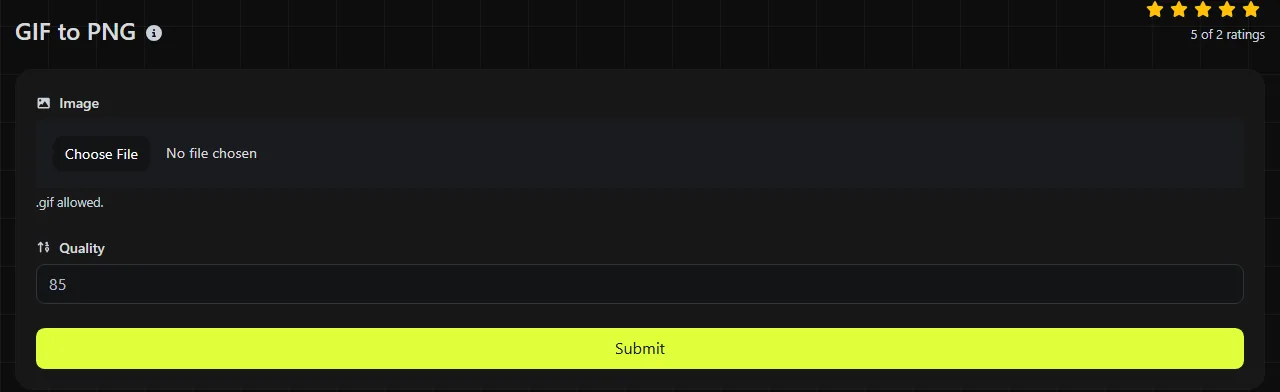
How do I convert a GIF to PNG?
The conversion happens entirely in your browser. Your GIF is never uploaded to a server, which is helpful when the image contains unpublished artwork, internal diagrams, or other material you would rather not send to a third-party conversion service.
What changes when I convert a GIF to PNG?
GIF and PNG have different color, transparency, and animation capabilities.
- Color GIF is limited to a palette of no more than 256 colors per frame. PNG can store truecolor images with millions of colors, although converting the file cannot recreate colors that were removed when the GIF was made.
- Transparency GIF typically treats one palette color as fully transparent. PNG supports an alpha channel, allowing partial transparency and smoother translucent edges.
- Animation GIF can contain multiple timed frames. A PNG datastream can contain either a static image or an animation. An animated PNG datastream can represent multiple timed frames.
- Compression Both formats use lossless compression for the pixel data they contain. GIF uses LZW compression, while PNG uses DEFLATE compression and image filters.
- Support GIF and PNG both work in major browsers and common image software. However, websites and messaging platforms may handle animated GIFs differently from static PNG files.
Converting a GIF to PNG does not improve its underlying detail. If the GIF was created from a JPEG or reduced to a 256-color palette, saving it in a lossless format will not restore the discarded information.
When should I use PNG instead of GIF?
Use PNG when you need a static image, lossless editing, or better transparency than GIF can provide.
Converting to PNG makes sense for interface icons, diagrams, logos, screenshots, and small pieces of web artwork. For example, a static GIF logo being edited in Figma or added to a WordPress page is usually easier to work with as a PNG. PNG is also suitable when you need to place an image over different background colors while preserving transparent areas.
Do not replace an animated GIF with a static PNG if you need the movement. Keep the GIF, use an animated PNG datastream if the receiving service accepts it, or consider a video format for longer animations.
Will the PNG file be larger than the GIF?
The PNG may be larger or smaller than the GIF, depending on the image content and output encoding, including color type and bit depth.
A simple static GIF with a small palette can be very compact. If it becomes a truecolor PNG, a higher bit depth or less compact sample representation may increase the file size even if the visible image looks much the same. For screenshots, flat graphics, and repeated areas of color, PNG compression can produce a smaller file than you might expect.
Animated GIF and animated PNG encode frames and timing differently, so their file sizes can vary substantially. There is no reliable size ratio for GIF-to-PNG conversion.
Tricky files and conversion checks
A valid GIF contains correctly encoded GIF image data. Renaming a JPEG from photo.jpg to photo.gif does not convert it and may cause an image decoder to reject the file.
- A filename such as café launch 01!.gif can contain spaces, numbers, punctuation, or accented characters without changing the pixels. Browser and operating system rules still determine how the filename is handled.
- A zero-byte file is not a valid GIF and contains no image to convert.
- A damaged or incomplete GIF may fail to decode. Some software may display it only partially.
- A very large or long animated GIF can require substantial memory during browser-based GIF-to-PNG conversion because the browser must decode the image data locally. The GIF is not uploaded, but the conversion is still subject to the device's memory limits.
Frequently asked questions
Can PNG files be animated?
A PNG datastream can be static or animated. Animated PNG supports multiple frames and timing information, and modern browsers commonly display it. However, some upload systems may reject it, flatten it, or handle it differently from GIF.
Will converting to PNG remove the background?
No. Changing a file from GIF to PNG format does not identify and erase a solid background. Removing a white or colored background during GIF-to-PNG conversion requires image editing, not just a format change.
Will comments and loop settings be preserved?
The available information does not specify whether GIF comments or loop settings are retained. Animated PNG supports frame timing and looping.
Can I convert the PNG back to GIF without losing anything?
Not always. A truecolor PNG may need to be reduced to 256 colors, and partial alpha transparency may become either fully transparent or fully opaque. These changes can cause banding, rough edges, or color shifts in the new GIF.
Is PNG a good format for photos?
PNG can store photos without further loss, but the files are often much larger than JPEG or WebP versions. If a small static file matters more than exact pixel preservation, GIF to JPG may be a better option, although JPEG does not support transparency.
Similar Tools
Easily convert GIF image files to ICO format with our GIF to ICO converter tool for creating favicons.
Easily convert GIF image files to WebP format with our GIF to WebP converter tool for efficient image compression.
Easily convert GIF image files to JPG format with our GIF to JPG converter tool for versatile image usage.
Popular Tools
Create your own custom signature and download it easily with our signature generator tool for personalized e-signatures.
Calculate the size of any text in Bytes (B), Kilobytes (KB), or Megabytes (MB) using our text size calculator tool.
Use the reverse IP lookup tool to find the domain or host associated with any IP address quickly and easily.
Use our ping tool to check the status and response time of any website, server, or port quickly and efficiently.
Generate your free WhatsApp link instantly with our WhatsApp Link Generator. Add a custom message and start chats in one click. No login or coding required.
Digily Link's IP lookup tool provides detailed information about any IP address. Use this free online service to get comprehensive IP data.