WebP to ICO
Easily convert WebP image files to ICO format with our WebP to ICO converter tool for creating favicons.
WebP to ICO is a free tool that converts a WebP image into an ICO file for use as a website favicon or Windows icon.
How do I convert WebP to ICO?
Choose your WebP file, run the conversion, and then save the resulting ICO file to your device.
- Select a WebP image, preferably square and with enough resolution for the required icon sizes.
- Convert it to ICO and save the output with a clear filename such as favicon.ico.
- Open or deploy the ICO file, then check it at small sizes such as 16 × 16 and 32 × 32 pixels.
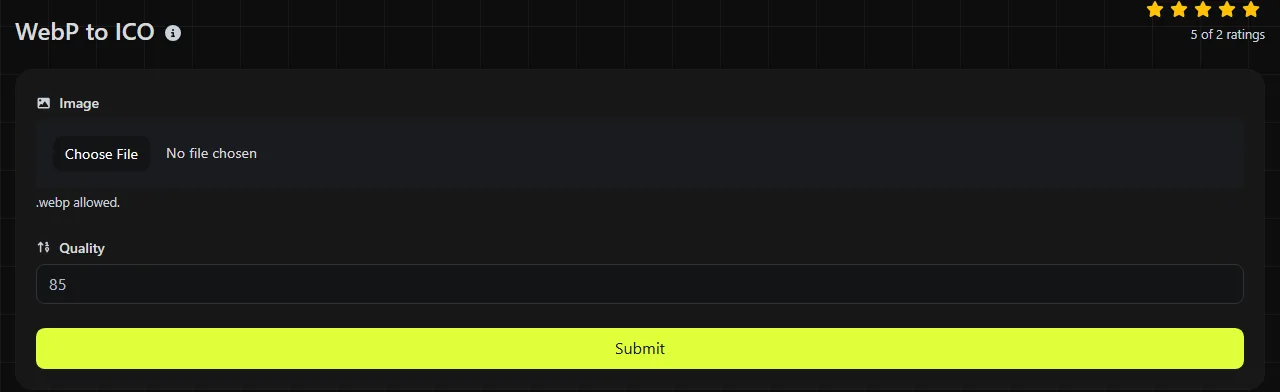
The conversion happens entirely in your browser. Your WebP image is never uploaded to a server, which is useful when the source contains an unpublished logo, internal product mark, or other private artwork.
What changes when WebP becomes ICO?
The image is decoded from WebP and placed in the ICO format, changing its compression, supported uses, and handling of features such as animation.
- Transparency: WebP can contain an alpha channel, and modern ICO images can also support full alpha transparency. Check the converted icon against both light and dark backgrounds, especially around soft edges and shadows.
- Animation: WebP can be animated, but ICO has no standard animation support. An animated WebP cannot remain animated after conversion, so extract or create the intended static frame first.
- Compression: WebP uses modern lossy or lossless compression. ICO is a container whose image entries commonly use PNG compression or BMP-style pixel data, so the original WebP compression is not retained.
- Browser and platform support: WebP is widely used for images on modern websites. ICO is broadly compatible as a browser favicon and is also recognized by Windows for icons, but it is not a practical general-purpose format for photographs or page content.
Converting a lossy WebP to ICO does not restore detail removed by the original compression. Blurring, ringing around edges, and color banding may remain and can become more noticeable when the image is sharpened or reduced to favicon size.
When does converting WebP to ICO make sense?
Conversion makes sense when a logo or symbol exists as WebP, but a website, Windows shortcut, or older integration specifically requires an .ico file.
A typical example is a 512 × 512 transparent brand-mark.webp prepared as favicon.ico. The output is an ICO container, not a WebP image with a renamed extension. For favicons, simple shapes, strong contrast, and limited fine detail tend to remain legible at small dimensions.
It does not make sense when you only need a lossless copy for editing. In that case, WebP to PNG is usually the better option because PNG is widely supported by image editors and preserves transparency without turning the image into an icon container.
ICO dimensions and file size
The ICO file may be larger than an equivalent WebP, although its actual size depends on its pixel dimensions, color detail, transparency, and the number of icon sizes stored inside it.
WebP is designed for efficient web image compression. ICO prioritizes icon compatibility and may contain several representations, commonly including 16 × 16, 32 × 32, 48 × 48 and 256 × 256 pixels. Each additional representation adds data. A small ICO containing one reduced image can still be smaller than a large source WebP, so there is no fixed size ratio.
Do not assume that converting WebP to ICO creates a multi-size icon. After conversion, inspect the ICO with an icon-aware viewer if a Windows application or legacy system requires specific dimensions.
Common reasons favicons fail
An ICO file converted from WebP can still display poorly or fail to appear if the source artwork or website setup is unsuitable.
- An incorrect favicon reference or an unsuccessful server response can prevent the ICO from loading.
- Replacing a favicon may seem to fail because browsers cache site icons separately from regular page images.
- A non-square source may be stretched, cropped, or surrounded by unwanted space during an icon workflow.
- Thin lettering and detailed photographs often become unreadable at 16 × 16 pixels.
- Spaces, accented letters, and non-Latin characters in the local source filename do not define the image format, but a simple deployed name such as favicon.ico can reduce filename encoding or reference errors.
Frequently asked questions
Can I just rename a WebP file from .webp to .ico?
No. Renaming the extension does not change the encoded image data, so software will still find WebP content inside the file. The image must be decoded and written as a genuine ICO container.
Will an ICO file keep WebP metadata?
Do not count on camera, color-profile, or descriptive metadata surviving an icon conversion. ICO is intended to store icon images and dimensions rather than the broader metadata commonly associated with photographic formats. Keep the original WebP if that information matters.
Can I use ICO for a macOS application icon?
ICO can be used as a website favicon viewed on macOS, but native macOS application bundles normally use the ICNS format or platform-specific asset catalogs. Converting to ICO alone does not create a complete macOS application icon set.
Why does my old favicon still show after conversion?
The browser may have cached the ICO created from your WebP. Confirm that the HTML points to the correct file and that the server returns it successfully, then clear the relevant site data or test with a new filename. Also check any web app manifest, since it may specify separate icons.
Final favicon checks
View the ICO at its actual small size instead of judging it only from a magnified preview. Confirm that transparent edges are clean, the symbol remains recognizable at 16 × 16 pixels, and the deployed path matches the reference on the page or in the application. Keep the original WebP as the editable source because repeated conversions cannot recover lost image quality.
Similar Tools
Easily convert WebP image files to GIF format with our WebP to GIF converter tool for creating animated images.
Easily convert WebP image files to PNG format with our WebP to PNG converter tool for high-quality images.
Easily convert WebP image files to JPG format with our WebP to JPG converter tool for versatile image usage.
Popular Tools
Create your own custom signature and download it easily with our signature generator tool for personalized e-signatures.
Calculate the size of any text in Bytes (B), Kilobytes (KB), or Megabytes (MB) using our text size calculator tool.
Use the reverse IP lookup tool to find the domain or host associated with any IP address quickly and easily.
Use our ping tool to check the status and response time of any website, server, or port quickly and efficiently.
Generate your free WhatsApp link instantly with our WhatsApp Link Generator. Add a custom message and start chats in one click. No login or coding required.
Digily Link's IP lookup tool provides detailed information about any IP address. Use this free online service to get comprehensive IP data.