URL parser
Extract detailed information from any URL using our URL parser tool for accurate web address analysis.
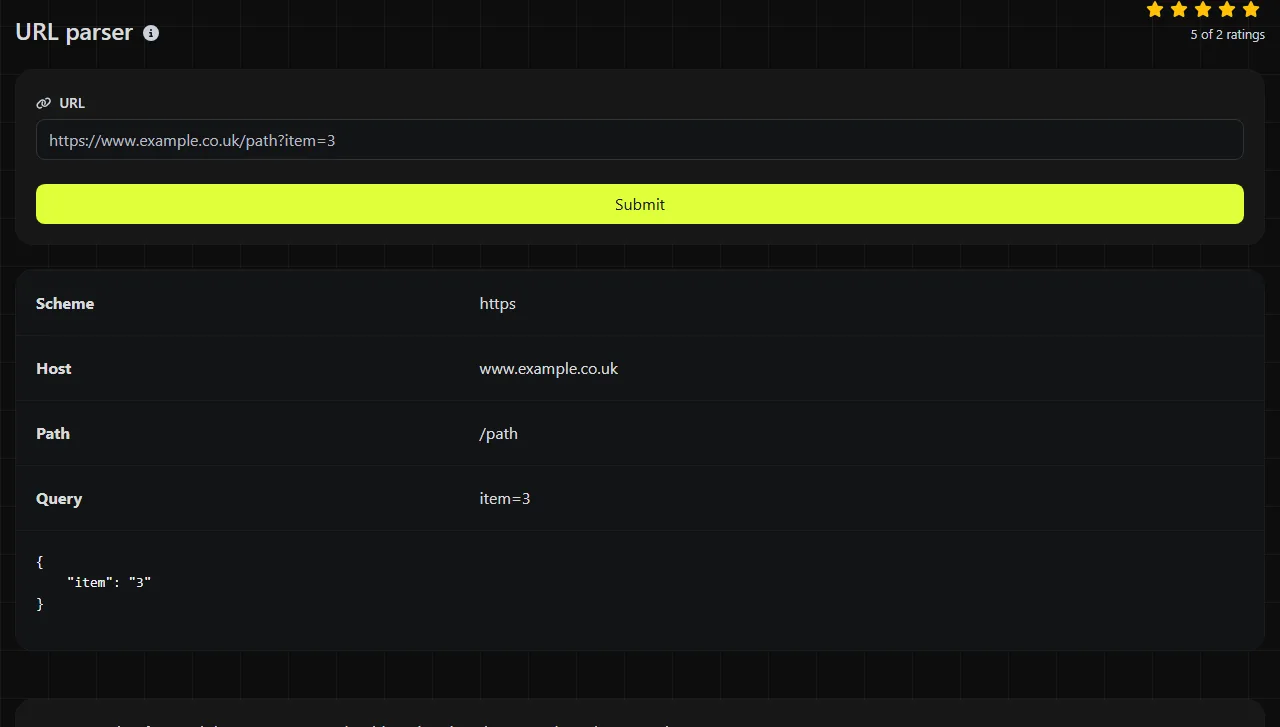
URL parser is a free tool that separates a web address into its scheme, path, and query string.
What does a URL parser extract?
A URL parser identifies the structural components of a web address, so you do not have to split the text manually. This tool returns three fields produced by PHP's parse_url function.
- Scheme identifies the protocol or addressing scheme, such as https or http.
- Path identifies the path component, such as /account/orders/42.
- Query contains the text after the question mark that starts the query component and before any unencoded number sign, such as page=2&sort=date.
Parsing is useful when inspecting API requests, callback URLs, application logs, or third-party data. It lets you distinguish routing information from query parameters before debugging, logging, or transforming the address.
The returned fields do not include a separate hostname, port, or fragment. If you need those components, use a more comprehensive URL parsing library in your application.
How do I use the URL parser?
Enter the complete or partial URL, then inspect the scheme, path, and query values returned by the tool. A complete absolute URL usually provides the clearest result because it states the scheme explicitly.
- Copy the URL from your browser, API response, webhook record, or server log.
- Include the query string if you need to inspect parameter names or values.
- Compare the returned path with the route your application expects.
- Check whether the scheme and query are present where your integration requires them.

Processing takes place on the server. Your input is sent to the server over HTTPS and is not stored. Even so, avoid submitting active access tokens, signed download links, session identifiers, or other credentials when a redacted example can answer the same question.
Examples and how to interpret the results
For an absolute API URL, the parser separates the protocol from the route and the raw query string.
Input https://api.example.co.uk/v1/orders/42?expand=items¤cy=GBP
Scheme https
Path /v1/orders/42
Query expand=items¤cy=GBP
The query is returned as a single component. Under the common form/query-string convention, the ampersand separates fields, while the first equals sign in each field separates its name from its value. Parsing the URL alone does not confirm that expand or currency is a parameter recognized by the API.
A relative reference can also contain a path and query without specifying a scheme.
Input /search?q=red%20shoes&page=2
Scheme no scheme component
Path /search
Query q=red%20shoes&page=2
An absent scheme is often expected for links generated within the same website. However, in data that should contain absolute callback URLs, the same result may reveal a missing https:// prefix.
This parser is not a URL validator. It can help reveal suspicious structure, such as a missing scheme, an unexpected path, or query text in the wrong place. However, a parsed result does not prove that the address exists, resolves in DNS, or returns a successful HTTP response.
What happens with spaces, punctuation, and unusual input?
Reserved characters affect how a URL is divided, while encoded characters generally remain part of the component where they appear. The parser separates components rather than decoding or normalizing their contents.
- An unencoded question mark starts the query component. A literal question mark intended as data outside an existing query should be percent-encoded if it would otherwise act as the query delimiter.
- An ampersand commonly separates query parameters, but this tool returns the entire query string rather than interpreting each parameter separately.
- An unencoded number sign (#) is the fragment delimiter in standard URL syntax. Fragment data is not one of the fields returned here.
- Spaces should normally be encoded, commonly as %20. A plus sign may represent a space in form-encoded query data, but that interpretation is part of query decoding rather than URL parsing.
- Accented and non-Latin path or query text should use UTF-8 percent-encoding when required by the receiving system. Internationalized domain names use their ASCII-compatible form for broad protocol compatibility.
- Numbers have no special parsing behavior. They remain ordinary characters within a path or query value.
Empty input has no useful URL structure to inspect. Very long URLs may also run into limits elsewhere, including browsers, web servers, proxies, and application frameworks. This tool does not determine whether another system will accept a particular URL length.
When is parsing a URL useful?
Parsing is useful when you need to diagnose how an address is structured before code or infrastructure acts on it. Common cases include checking webhook callback addresses before deployment, reviewing redirect targets, separating API routes from filters, and reading URLs copied from reverse-proxy logs.
It is usually unnecessary when only a machine will consume a known, already-structured URL and your application already uses a URL library. It is also the wrong operation if you need to test availability, follow redirects, decode every query parameter, or verify that a domain is trustworthy.
For repeated or automated work, use the URL features native to your environment. PHP has parse_url, browser JavaScript has the URL interface, Node.js provides the URL class, and Python includes urllib.parse. A small command-line script is more appropriate than manual parsing when processing a log file containing thousands of addresses.
Do not parse a URL just to reformat it when it already has the exact representation required by the receiving system. Re-encoding or rebuilding addresses without a clear reason can alter query signatures, duplicate parameters, or reserved characters.
Frequently asked questions
Can I parse a URL without http or https?
Yes. PHP's parse_url function can interpret relative references and partial URLs, although no scheme will be available if one was not provided. Be careful with scheme-relative addresses that begin with two slashes, since their meaning depends on the surrounding document or application.
Does the parser preserve repeated query parameters?
The query is returned as a raw component, so repeated names can remain in their original sequence. How values such as tag=red&tag=blue are converted into arrays or individual values depends on the query-string parser used afterward.
Is it safe to paste a signed URL?
The input is sent over HTTPS and is not stored, but a signed URL can still grant access to private content while its signature remains valid. Redact the token or replace the hostname and values with representative placeholders whenever the exact credentials are unnecessary.
Why does a valid-looking URL behave differently in my application?
Differences can result from framework-specific query decoding and Unicode normalization. Applications may also apply additional rules after parsing, including hostname allowlists and redirect restrictions. Compare the raw URL byte for byte, then check what your application decodes or rewrites before sending the request.
Popular Tools
Create your own custom signature and download it easily with our signature generator tool for personalized e-signatures.
Calculate the size of any text in Bytes (B), Kilobytes (KB), or Megabytes (MB) using our text size calculator tool.
Use the reverse IP lookup tool to find the domain or host associated with any IP address quickly and easily.
Use our ping tool to check the status and response time of any website, server, or port quickly and efficiently.
Generate your free WhatsApp link instantly with our WhatsApp Link Generator. Add a custom message and start chats in one click. No login or coding required.
Digily Link's IP lookup tool provides detailed information about any IP address. Use this free online service to get comprehensive IP data.