A WhatsApp link opens a chat with your number without the customer saving you as a contact first. The format is wa.me/ followed by your full number in international format, so a UK mobile such as 07700 900123 becomes wa.me/447700900123. To add a pre-filled message, put ?text= and your message after the number. Anyone with an active WhatsApp account can tap it on a phone or on WhatsApp Web.
WhatsApp calls this feature click to chat. Below we show the exact format, a free generator that builds it for you, and one setting that quietly removes your pre-filled message if you are not careful. WhatsApp's rules come from its Help Centre, checked on 18 October 2026.
How do I create a WhatsApp link?
WhatsApp's instructions are short. Use https://wa.me/ followed by your full phone number in international format, and leave out any zeros, brackets, dashes or the plus sign.
| Written the UK way | International format | In the link |
|---|---|---|
| 07700 900123 | +44 7700 900123 | wa.me/447700900123 |
The common mistake is keeping the leading 0 of a UK mobile number. The 44 country code replaces it. A link such as wa.me/4407700900123 will not reach you.
The number above comes from a range Ofcom sets aside for TV and radio drama, so it is not allocated to anyone and will not open a real chat. It only shows the format. Use your own active WhatsApp number. Format rules from WhatsApp Help Centre, How to use click to chat.
How do I add a pre-filled message to a WhatsApp link?
Add ?text= after the number, followed by your message in URL-encoded form, where spaces become %20 and some punctuation is replaced with codes. The message appears in the customer's text box when the chat opens. It is not sent automatically, so the customer can edit it and then tap Send.
Writing the encoding by hand is fiddly, so use a generator. Our free WhatsApp link generator takes a phone number and a message and builds the link once you've filled in the fields.
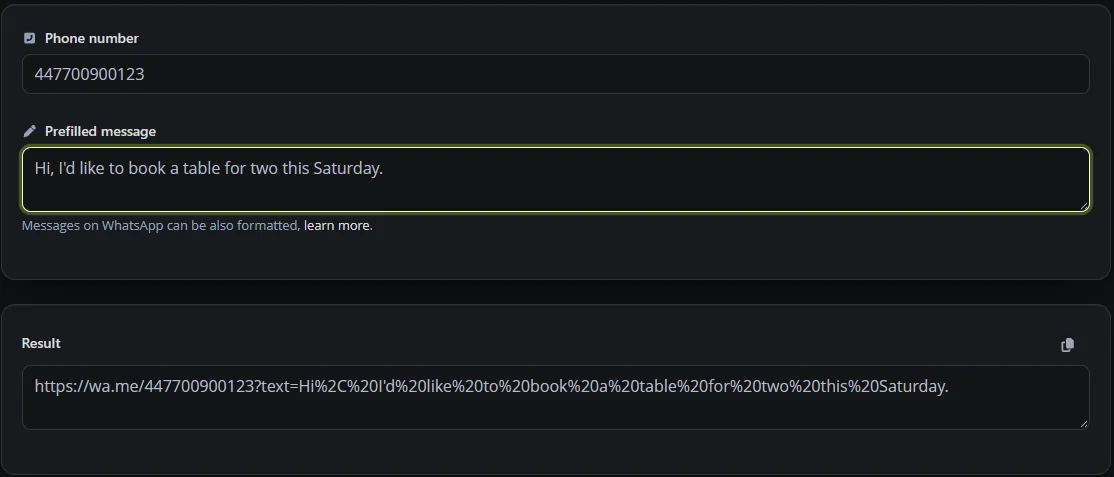
A good pre-filled message helps customers get straight to the point. "Hi, I'd like to book a table for two this Saturday" gives you a useful starting point instead of leaving them to write everything from scratch. Keep it short and leave room for them to add details.
Where should a business use its WhatsApp link?
- On your link in bio page, as a "Message us on WhatsApp" button next to bookings and directions.
- On your website, and in your Google Business Profile's chat option if Google offers it for your verified profile and region.
- On printed material, as a QR code on a menu, a van or a shop window. Digily Link has a WhatsApp QR code type on the free plan.
- In your email signature, because many customers would rather send a quick message than call.
Use different pre-filled messages for different places, such as "I saw your van" or "Question about the menu". As long as the customer keeps that text, it gives you a clue about where the enquiry came from.
If you use the free WhatsApp Business app, it also has its own short link and QR code in its business tools, with a default message you can edit inside the app. Note that WhatsApp and WhatsApp Business cannot run on the same phone number at the same time, so a separate business number is the usual set-up.
Should I shorten my WhatsApp link?
A short link makes a long wa.me address with an encoded message easier to read and print, and it lets you track how often the link is opened. Those figures show link activity, not the number of customers who actually sent a message, so treat them as interest rather than enquiries.
There is one setting to watch. Digily Link short links can use app linking, which opens supported apps directly. For WhatsApp, app linking hands the app your phone number only, so the pre-filled message is dropped. If your link includes a message, leave app linking off for that short link. On phones with WhatsApp installed, the wa.me address usually opens the app anyway. We found this by reading how our own app linking builds WhatsApp addresses, and it is the kind of detail worth testing on any shortener you use.
WhatsApp link mistakes to avoid
- Keeping the 0 after the country code, or adding a plus sign or spaces inside the link.
- Putting a personal mobile number on a public poster. Consider a separate business number on the WhatsApp Business app.
- A pre-filled message so long that customers have to delete half of it.
- Not testing. Tap the link on a phone that does not have your number saved, and on WhatsApp Web, before you print it.
Frequently asked questions
Does the customer need to save my number first?
No. That is the point of click to chat. WhatsApp says the link opens a chat even if the number is not in their address book, as long as your number has an active WhatsApp account.
Does a WhatsApp link work on a computer?
Yes. WhatsApp says click to chat works on both phones and WhatsApp Web.
Can I change the pre-filled message later?
With a standard wa.me link the message is part of the address, so a new message means a new link. If you share a Digily Link short link instead, you can change the wa.me address behind it without changing what you printed. The WhatsApp Business app's own short link also lets you edit its default message.
Does a WhatsApp link send the message automatically?
No. It opens the chat with the message in the text box, and the customer decides whether to send it.
How do I make a WhatsApp QR code for my business?
Create a QR code of the WhatsApp type in Digily Link, or make a QR code of your short link, and test it on a phone before printing. The WhatsApp Business app can also show a QR code for your business number.
Is a WhatsApp link free?
Yes. WhatsApp does not charge to create a click to chat link, and the Digily Link generator is free to use without an account.
Can I put a WhatsApp link in my Instagram bio?
Yes. Add it as one of your profile links, or as a button on a link in bio page alongside your other links.
Want a WhatsApp button on a page with your bookings and directions? See how a Digily Link link in bio page works.