To shorten a link, paste the long address into a URL shortener, choose a short name if the tool lets you, and copy the short link it gives back. That takes under a minute. What matters more is what happens afterwards. If you plan to reuse a link, being able to change where it goes and check the clicks saves trouble later.
This guide covers how to shorten a link for free, the choices that make a short link better than a random string, and the mistakes that break printed links months later. The Digily Link details are from our own plan settings on 18 October 2026.
How do I shorten a link for free?
On Digily Link, a free account gives you 50 short links. The steps are the same on a phone or a computer.
- Sign in and open Short Links, then choose Shortened URL.
- Paste the long address into Long URL.
- Pick a domain. Free accounts can use short domains such as short.bi, digily.uk and digily.bio as well as digily.link.
- Type a short name, or leave it empty for a random one. Names can be 3 to 64 characters.
- Choose Shorten URL and copy your new link.
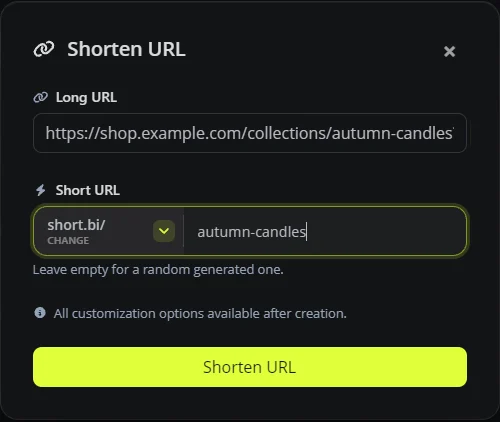
Once the link exists, its settings page opens up more options, including app linking, UTM parameters, targeting and the redirect type. You do not need any of them to start.
Can I shorten a URL without an account?
Some shorteners let you make a link without signing in, but editing the destination or seeing detailed statistics may then need an account or a paid plan. Check what you can manage later before you put the link on anything printed. If the link is going into a bio or onto a poster you will not want to update in several places, an account is worth the extra minute. Digily Link needs a free account for this reason. Every link you make stays in your list, where you can edit it, pause it or check its statistics.
What makes a good short link?
A random string such as short.bi/x7Kp2 works, but people trust and remember a link more when they can read it. A few habits help.
- Use words, not codes. short.bi/autumn-candles gives people a clue about what to expect before they tap, although it does not show the final destination.
- Keep it typeable. Avoid characters that are easy to confuse when read aloud or printed, such as a capital I and a lower-case l.
- Match the channel. If you share the same page on Instagram and in an email, two short links with different names let you compare the clicks on each. Add matching UTM tags if you also want the visits split by channel in Google Analytics.
- Do not change the name after printing. Changing the short name later breaks the old address, and anything already printed with it stops working.
For a business, the strongest version is a short link on your own domain. That needs a paid plan on Digily Link, and our guide to branded short links on a .uk domain explains the set-up.
How do I see how many people clicked my short link?
Open the link's statistics from your Short Links list. On the free plan you keep 30 days of history. You will see clicks over time along with the country, device and referrer where they are available. Some clicks arrive without referrer information, for example from apps or typed-in addresses.
Be clear about what a click means. A short link counts how often it was opened, which is not the same as the number of different people, and automated security scanners in some email systems can open links too. A click also does not tell you whether someone bought or booked anything. UTM parameters let an analytics tool such as Google Analytics recognise the campaign the visit came from, and measuring sales or bookings needs conversion tracking on your own website. Our UTM guide with a UK campaign example walks through it, and the free UTM link generator builds the tags for you.
Can a short link open the app instead of the browser?
Yes, for supported services. App linking is on the free plan. When it is switched on for a link to YouTube, Spotify, Instagram or another supported app, it can open the content in that app if it is installed, and otherwise the link opens in the browser. The result depends on the phone, the app and where the link is tapped, so test it on an iPhone and an Android phone before sharing it widely.
Test it before you rely on it, because the app only receives what its own link format supports. For example, a YouTube link opens the right video, but app linking passes the video ID only, so a start time in the original address does not carry over. Our guides to the YouTube link shortener and Spotify link shortener go into detail.
Common short link mistakes to avoid
- Printing without testing first. Tap the link, and scan the QR code at the size you will print it, on more than one phone, including one that is not logged in to your account.
- Printing the long address of a page that might move. Print the short link instead, and change its destination in your account when the page moves, so the printed address stays the same.
- Reusing one link for everything. You lose the ability to tell your channels apart.
- Using a shortener you cannot log in to. If the service closes or the link breaks, you have no way to fix it.
Once the basics work, two guides go further. Advanced link redirection covers sending visitors to different pages by country, device or language, and what is deep linking? explains how app linking opens links in the app instead of the browser.
Frequently asked questions
Is it free to shorten a link?
Yes. Digily Link's free plan includes 50 short links in total, 20 QR codes and 30 days of statistics, with no adverts.
Do short links expire?
Digily Link short links have no automatic expiry date, so a link stays active until you pause or delete it, as long as the page it points to is still there. Setting an expiry on purpose is a paid feature.
Can I change where a short link goes?
Yes. Open the link, change the destination URL and save. The short address stays the same, which is why short links suit QR codes and print.
How do I shorten several links at once?
Use bulk create from the Short Links page. The free plan creates up to 10 links in one go.
Are short links bad for trust?
Random strings can look suspicious, especially in messages. A readable name, or a short link on your own domain, helps people recognise your business, although they should still check unfamiliar links before opening them. Our URL redirect checker shows where a link leads before anyone opens it.
Can I see who clicked my link?
No. Short link statistics show totals by country, device and referrer, not the identity of the people who clicked.
Can I turn a short link into a QR code?
Yes. Create a QR code of the URL type and tick Dynamic QR code, or pick one of your existing short links. The printed code then follows the short link, so you can change the destination later without reprinting. Do not change the short link's name afterwards, or the code stops working.
Ready to make your first one? See how Digily Link short links work.





