To add a link to an Instagram story, create your story, tap the Stickers icon at the top, choose Link, enter the web address and place the sticker on your photo or video. Anyone who can view your story can tap it. You do not need 10,000 followers, a rule that ended when Instagram opened link stickers to all accounts in October 2021, so if you cannot find the sticker the usual fix is updating the app.
We checked the steps against Instagram's Help Centre on 18 October 2026. The second half covers how to measure what happens after the tap, and when a link in your profile does the job better.
How do I add a link to my Instagram story?
- Start a story by sharing a photo or video, as you normally would.
- Tap the Stickers icon at the top of the screen.
- Choose Link.
- Enter the address you want the sticker to open and tap Done. Instagram's guide also mentions See preview, which shows what people will see when they open the link.
- Place the sticker where it is easy to spot, then share the story.
Instagram's sticker guide says anyone who can see your story can tap the sticker to visit the link. Who can see the story still depends on your account's privacy and audience settings. See Instagram Help Centre, Using stickers on Instagram.
Why can't I find the link sticker on Instagram?
Instagram's own advice when a sticker is missing is to update the app from the App Store or Google Play, and it notes that not every sticker is available to everyone. Start there. If the sticker is still missing after an update, restart the app and check again. When Instagram opened link stickers to everyone in 2021, it said that new accounts and accounts that repeatedly share content breaking its Community Guidelines might not get access, so a very new account may simply have to wait.
Two other cases are worth knowing about. Link stickers only work in ordinary, organic stories. If you are boosting a story or running it as an advert, Instagram uses its own call-to-action sticker instead, and partnership adverts cannot be created from stories that contain a link sticker. Details in Instagram Help Centre, About link sticker on Instagram Stories.
How do I know if people tapped my story link?
Start with Instagram itself. Insights on a professional account can show interactions with a story, including link taps where that metric is available. That tells you about activity inside Instagram. To see what people did after the tap, and to compare one story with another, put a short link with UTM tags in the sticker instead of the raw address.
- Create a short link for the page, for example digily.uk/autumn-menu.
- In the link's settings, open UTM Parameters and fill in source, medium and campaign, such as instagram, story and autumn_menu. Google Analytics recognises instagram as a social source, so the visits land in its social channel either way.
- Paste the short link into the link sticker.
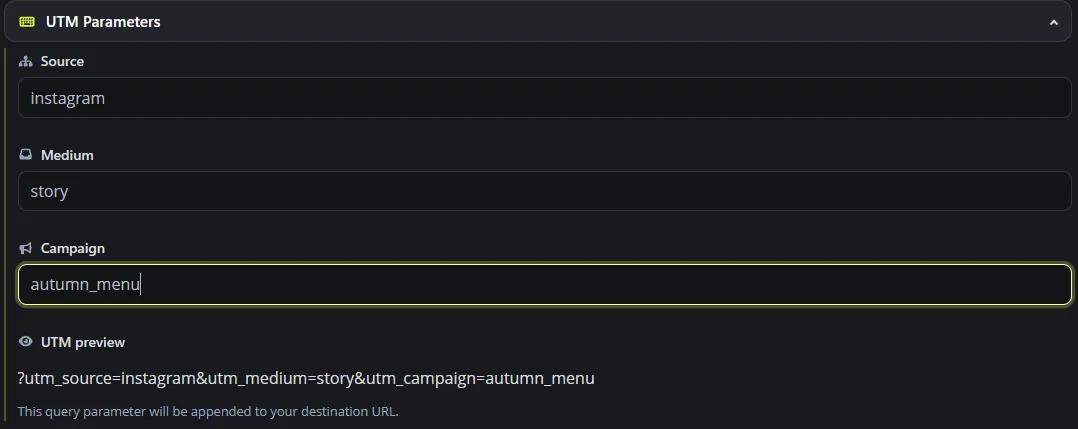
Digily Link then records the clicks on that short link. If your website has Google Analytics 4 set up and the tags survive the redirect, GA4 can attribute those visits to the campaign. Expect the two numbers to differ a little, because some visitors block analytics and some clicks never become a full page view. Use a fresh short link, or at least a fresh campaign name, for each story you want to compare. UTM tags are on Digily Link's free plan, along with 30 days of click history. For the GA4 side, see our UTM guide with a UK campaign example.
Story link or link in bio, which should you use?
They do different jobs, and you can use both.
| Link sticker in a story | Links in your profile | |
|---|---|---|
| How long it stays | Usually 24 hours, or longer if you add the story to a Highlight | Until you change it |
| How many links | One sticker per story frame is the usual approach | Up to five websites, according to Instagram |
| Best for | Time-limited offers, new posts, events this week | Your shop, bookings, contact details and anything evergreen |
Instagram's Help Centre says you can add up to five websites to your profile, from Edit profile then Links, and Meta One subscribers can add up to 20. If you need more destinations, or a branded page with your own design and extra content, a link in bio page brings them together under one address. Steps in Instagram Help Centre, Add a website to your Instagram profile.
Tips for story links people actually tap
- Say what happens on the other side. "Book Saturday" or "Today's menu" makes the destination clearer than a bare web address, so customise the sticker text if Instagram offers it on your version of the app.
- Keep the sticker away from the very top and bottom of the frame, where the profile name and reply bar sit.
- Send people to the exact page, not your home page. If the story is about one product, link that product.
- Check the page on a phone. Story taps open on mobile, usually inside Instagram's in-app browser, so a page that is slow or awkward on a small screen can make visitors leave.
- If the link points to YouTube or Spotify, test it from Instagram before posting. App linking on a short link opens supported apps on many phones, but in-app browsers vary, so a quick test tells you what your followers will see.
Frequently asked questions
Do you need 10,000 followers to add a link to an Instagram story?
No. Instagram opened link stickers to accounts of all sizes in October 2021. Very new accounts and accounts with repeated guideline breaches may be restricted, and otherwise updating the app is the first fix.
Can I add links to several story frames?
Yes. Each story frame is a separate post, so you can put a link sticker on several frames. Keep it to one clear action per frame so people know what to tap.
Can I see who tapped my story link?
Instagram's insights and Digily Link's statistics show totals, such as how many taps or clicks there were, not a list of the people who tapped.
Can I add a link to an Instagram post instead?
For most accounts, a web address in an ordinary post caption is not clickable, which is why accounts say "link in bio". In September 2026 Meta announced Meta One, whose advanced paid plans include links in organic posts and Reels, with availability varying by account and region. Use the profile links or a story sticker for anything you want people to tap.
Can I edit the link after posting the story?
Plan for the link to stay as posted. If you use a short link in the sticker, you can change where the short link goes from your Digily Link account without touching the story.
Why does my story link open inside Instagram?
Instagram often opens links in its built-in browser. Depending on the phone and app version, visitors can usually open the page in Safari, Chrome or another browser from that browser's menu.
For the links that stay in your profile, see how a Digily Link link in bio page works.





