A digital business card lets you share your contact details without paper. There are several ways to do it, and three common ones are a QR code that contains your details, a link to an online contact card, and an NFC card that opens a link with a tap. You can make the first two for free. The NFC card is a physical product you buy, and it works best when it points at a link you can edit.
Below we compare the three for a UK sole trader or small team, including the practical trade-offs worth weighing before you print or buy anything. Digily Link plan details are from our own settings on 18 October 2026.
What is a digital business card?
At its simplest, it is your name, phone number, email and website in a format a phone can open and save as a contact, sometimes with an extra tap to confirm. The usual format is the vCard, the same .vcf file your phone uses when you share a contact. The QR code on a flyer and the card with a chip in it are both ways of getting that vCard, or a page that holds it, onto someone's phone.
QR code, vCard link or NFC card, which should you choose?
| vCard QR code | vCard link | NFC card | |
|---|---|---|---|
| How people use it | Scan with the phone camera | Tap a link in an email, message or bio | Hold the phone near the card |
| Can you edit details later? | Not if the details are inside the code | Yes, the link stays the same | Yes, if the chip opens a page or redirect you can update |
| Can you track opens? | No | Yes, the link counts opens | Yes, through the link it opens |
| Needs an internet connection? | No, the details are in the code | Yes | Yes, to open the link |
| Cost on Digily Link | Free plan, 20 QR codes | Free plan, 10 vCard links | Card bought separately |
| Best for | Printed cards, shop counters, van livery | Email signatures, WhatsApp, bio pages | Networking events and face-to-face meetings |
For a small business whose details may change, a vCard link with a QR code that points to it is the practical choice. The QR goes on anything printed, the link goes everywhere online, and you can update your number or job title without reprinting.
How to make a vCard QR code for a business card
On Digily Link, open QR Codes, create a new code and choose the vCard type. Fill in your name, email, website, company and job title, and the QR code preview updates as you enter your details. The page also tells you whether the code looks readable before you download it, though you should still test the printed version.
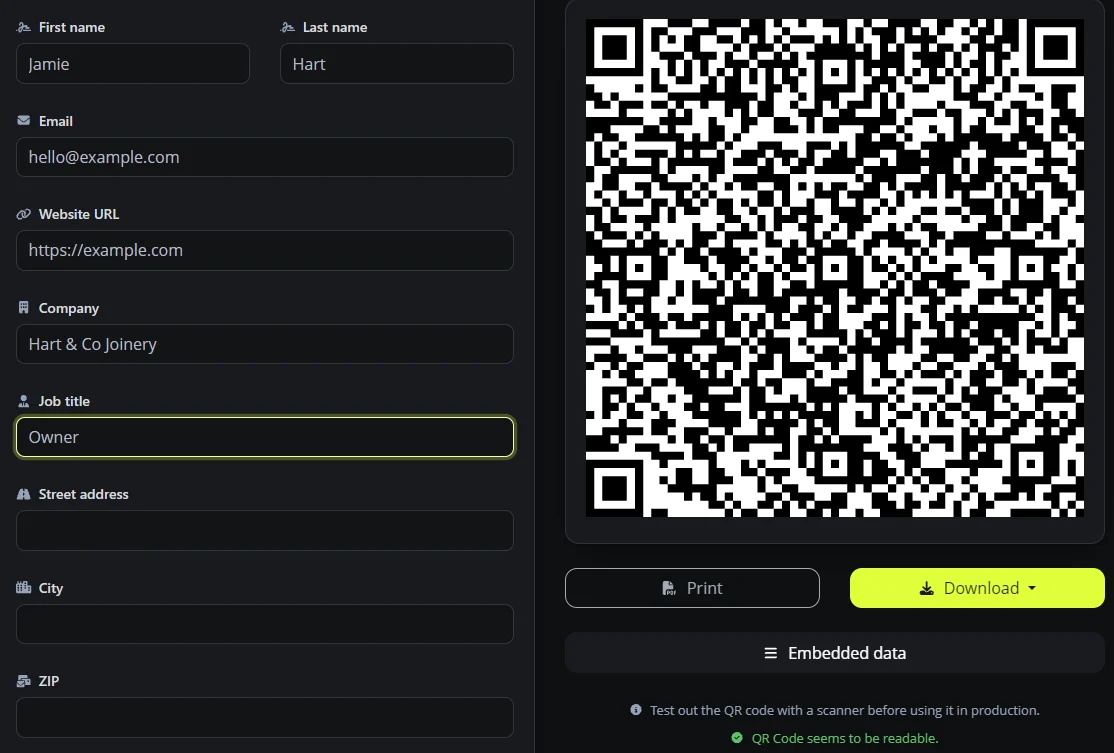
This kind of code stores your details inside the pattern. That is why it works without an internet connection on phones that support the format, and also why you cannot change it after printing. If your number changes, the printed cards are out of date. Our guide to vCard QR codes for business cards covers print size and scanning tests in more detail.
Why a vCard link is the more flexible option
A vCard link is a short address that opens your contact card and lets people save it. Because it is a link, you can change the details behind it at any time, and the address people already have keeps working. Digily Link calls these vCard Links, and the free plan includes 10 of them. Each one is tracked, so you can see how often your card is opened, whether people reach it directly, through a QR code or through an NFC card. An open does not prove that someone saved your details, though.
How to create a free vCard link and QR code
- In Digily Link, open vCard Links and choose Vcard link.
- Pick a short address, such as digily.uk/jamie-hart, and select Create Vcard URL.
- Fill in your contact details on the page that opens and save.
- Create a QR code of the URL type with your vCard link as the address, download it and test it on an iPhone and an Android phone.
Put the vCard link in your email signature, your WhatsApp Business profile and your link in bio page. Then make a QR code that points at the link rather than holding the details itself. You can then update the details behind the link without reprinting, as long as the link stays active. People who already saved your contact keep the old version until they save it again.
Are NFC business cards worth it?
An NFC card has a small chip that sends a link to a phone held near it. Many recent phones can read NFC tags. Apple documents background tag reading on iPhone XS and later models, while on Android it depends on the phone and on NFC being switched on. The person may still need to tap a notification to open your card. It is a quick way to share your details face to face, and some people find a tap easier than a scan.
Two practical points before you buy one. First, check whether the card needs a subscription, what still works if you cancel, and whether you can change where it points yourself. Providers handle this differently. Second, if you can choose what the chip opens, point it at a link you control, such as your vCard link or link in bio page. You do not need to rewrite the chip when your details change, because you update the page the link opens instead. Print a QR code on the back as well, because not every phone will read the chip at the first try.
What to put on a digital business card
- Your name as people search for it, and your job title or trade.
- Clear contact options. One phone number and one email address is usually easier for people than a choice of several.
- Your website or link in bio page, so the card leads somewhere useful after it is saved.
- Your business address only if customers visit you. A sole trader working from home may prefer the town alone.
Only include details you are happy for anyone holding the card to keep. A digital card is easy to forward.
The same applies in reverse. If you collect other people's cards, their details can be personal data under UK GDPR, and receiving a card does not automatically mean you can add someone to a marketing list. Check the ICO's guidance on direct marketing before sending promotional emails.
Frequently asked questions
Can I make a digital business card for free?
Yes. Digily Link's free plan includes 20 QR codes and 10 vCard links, with no adverts. Platform branding stays on free pages and your own domain is a paid feature. You only pay for an NFC card if you want one.
Can I use my phone as a digital business card?
Yes. Keep your vCard QR code or link on your phone, for example as a saved image or in your notes, and show the code or send the link when you meet someone.
Do people need an app to scan a vCard QR code?
Most modern iPhones and Android phones can scan QR codes with the built-in camera, without a separate app. What happens next depends on the phone. A vCard code usually opens a contact you can save, and a link code opens the link. Test your code on both before printing.
What happens if my details change?
A QR code with the details inside it needs reprinting. A vCard link, or a QR code that points to one, can be updated from your account. Anyone who saved your old details will still have them, so tell regular contacts when something important changes.
Do digital business cards work without the internet?
A QR code with your details inside it does. A vCard link and an NFC card that opens a link need a connection to load your details.
Can I add a contact card to my link in bio page?
Yes. The vCard block adds a "save contact" button to the page on paid plans. On the free plan, link to your vCard link from a button instead.
Ready to make yours? See the Digily Link QR code generator, or read how to build a professional email signature for a UK business to carry the same details.





