You can add a clickable website link to your TikTok profile once you have at least 1,000 followers, or before that if your business passes TikTok's business verification and becomes a Verified Business Account. The link goes in Edit profile, next to Links. If the option is missing, your account does not meet either condition yet, and the fix depends on whether you are a creator or a business.
We checked the rules below against TikTok's Help Centre and Business Help Centre on 18 October 2026. TikTok changes these settings from time to time, so the help pages linked in each section are the place to confirm anything before you rely on it.
How do I add a link to my TikTok bio?
TikTok's help centre gives four steps for adding a website link to your profile.
- In the TikTok app, tap Profile at the bottom.
- Tap Edit profile.
- Next to Links, tap Add.
- Follow the steps to link your website.
Steps quoted from TikTok Support, Adding a website link to your profile.
When someone taps the link, it opens in TikTok's in-app browser rather than leaving the app, and that affects what you should put at the other end. The same Links section is also where TikTok offers some linked accounts, such as Lemon8 where available, so choose the website option.
Why can't I see the option to add a link on TikTok?
The link field only appears for accounts that meet one of two conditions, either at least 1,000 followers or a Verified Business Account. A personal account with 400 followers will not see it, however complete the rest of the profile is. If you already meet one of the conditions and the option is still missing, update the TikTok app first, then report the problem to TikTok from within the app.
Two other limits catch people out. TikTok says it no longer supports links that open, or log you into, other social media apps, although you can still link to the website version of those platforms. It also limits how far people can follow a chain of external links inside its in-app browser, so a visitor may be asked to open the page in their phone's own browser instead. TikTok's advice is to use direct links that reach the intended site in a few steps.
Do you need 1,000 followers to put a link in your TikTok bio?
For a general (personal) account, yes. The only route that skips the follower count is a Verified Business Account, and it comes with a trade-off that rules it out for many creators.
| Your situation | Can you add a website link? | What to do |
|---|---|---|
| Creator, under 1,000 followers | No | Put a short, typeable address in your bio text and keep posting until the field unlocks |
| Creator, 1,000 followers or more | Yes | Add the link in Edit profile |
| Business selling a product or service | Yes, once verification is approved | Apply for business verification, wait for approval, then add the link |
Should I switch to a TikTok Verified Business Account to get a link?
Only if your account exists to promote a business. TikTok's own guidance is that anyone whose main goal is promoting a product or service should use a Verified Business Account. The cost is music. Verified Business Accounts use the Commercial Music Library, a catalogue of sounds cleared for commercial use, and lose access to the general music library. If your videos rely on trending songs, that is a real loss. If your account is mainly personal, waiting for 1,000 followers keeps the music library and still gets you the link.
Verification is not instant either. TikTok's Business Help Centre says the feature is only for users aged 18 or over, that you need a valid business licence or registration document that matches the region where the business operates (some countries ask for more), and that the review typically takes 1 to 5 business days. You get an in-app notification and an email once it is approved.
TikTok also advises against switching back and forth. Its help page says your verification is not saved, so moving back to a general account and then returning means verifying again. If you want to post personal content and promote a business, TikTok recommends two separate accounts.
To apply, go to Profile, tap the Menu button at the top, choose Settings and privacy, then Account, then Business verification, and follow the steps to upload your documents. A Verified Business Account is not the same as the blue verified badge, which has its own approval process. More detail in TikTok Support, Account types on TikTok and TikTok Business Help Centre, How to verify a TikTok account.
What should a TikTok bio link point to?
It depends on how many places you need to send people, because TikTok limits link chains and recommends direct links.
If all you want from TikTok viewers is one action, such as booking a table or buying one product, link straight to that page. There are fewer taps, and there is no second hop for TikTok's safety checks to interrupt.
If you need a shop, a booking page, a YouTube channel and a newsletter, a single destination page rarely covers them all, and a link in bio page is the practical answer. It keeps them under one address, at the cost of one extra tap, and it is not exempt from TikTok's browser checks. Put the most important button at the top so the tap people most need is the first one they see.
Whichever you choose, test it from TikTok on your own phone after you add it. Tap the profile link, then tap through to the final page, and note whether TikTok asks you to switch browser. A quick test catches problems before your visitors do.
How to set up a link in bio page for TikTok on Digily Link
A link in bio page on Digily Link is quick to set up, and the free plan is enough. It includes five bio link pages, 50 short links, 20 QR codes and 30 days of statistics, and your page carries no adverts.
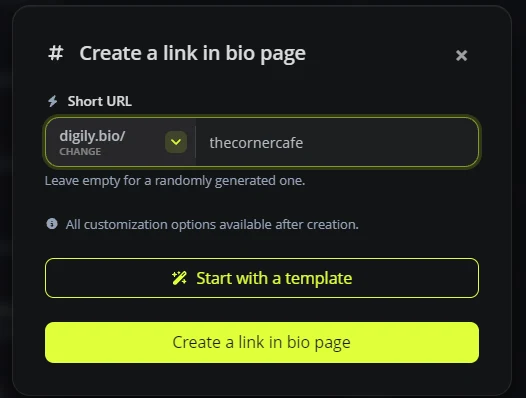
- Go to Link in Bio and choose Link in bio page. Pick a short address. On the free plan you can use shorter domains as well as digily.link, such as digily.bio and digily.uk, so digily.bio/thecornercafe is shorter to read out and to type than most shop URLs.
- Add the blocks people need. Start with two or three buttons for your main actions. The TikTok video block embeds one of your videos on the page itself, and the Instagram, YouTube and Spotify blocks are also on the free plan.
- Use the Copy button at the top of the editor, then paste it in Edit profile, next to Links.
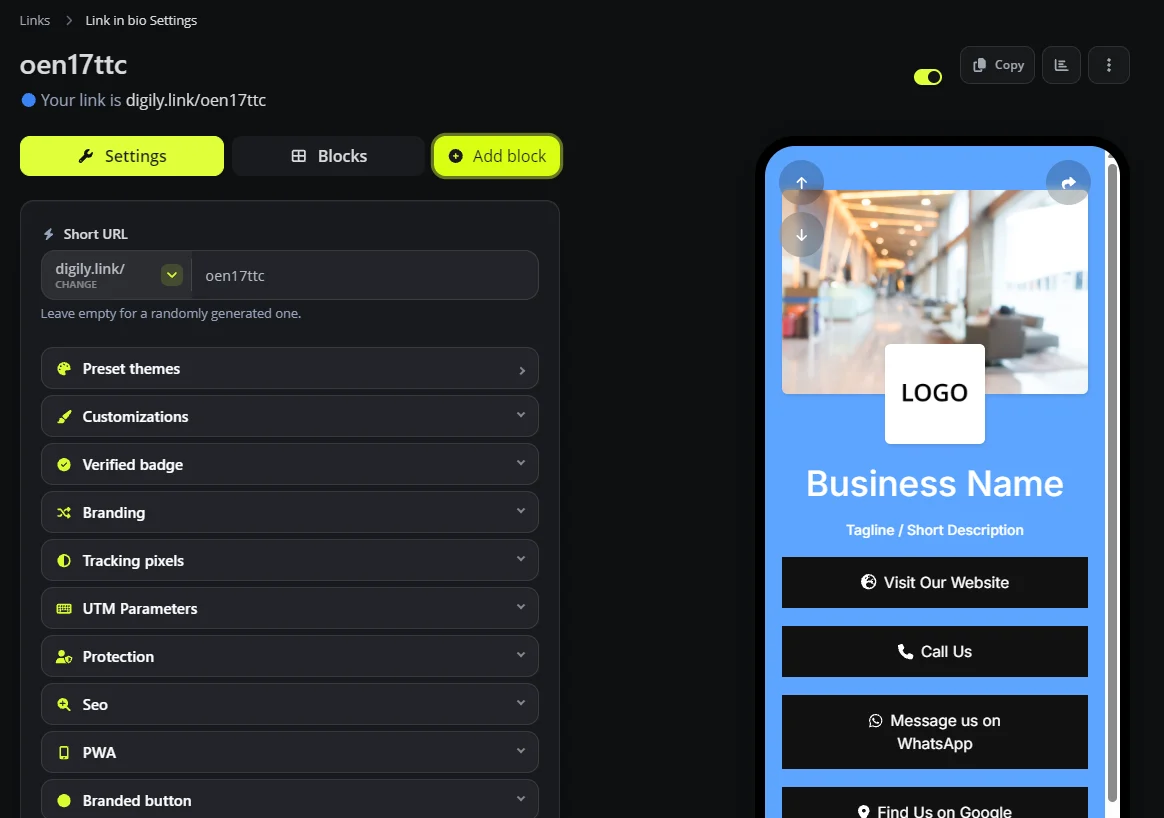
For a café, a sensible first screen has three buttons for today's menu, booking a table and directions. For a hairdresser, it is an appointment button, the price list and WhatsApp. Our guide to how UK small businesses use a link in bio page has more layouts by trade.
What if I have fewer than 1,000 followers?
You cannot add a tappable website link to a general account below 1,000 followers, and there is no setting that gets round it. What you can do is make your address easy to remember and type.
- Write a short address in your bio text, such as digily.bio/yourname. It will not be tappable, but people who want to find you can type it.
- Say it out loud in videos where it fits naturally, the same way you would mention a shop name.
- Keep the same address when the link field unlocks, so anyone who saved it still lands in the right place.
If you run a business and the music library is not important to you, business verification is usually the faster fix, allowing a few working days for the review.
Frequently asked questions
Why can't I add a link in my TikTok bio?
Your account has fewer than 1,000 followers and is not a Verified Business Account. TikTok only shows the website link field to accounts that meet one of those two conditions.
Can I add more than one link to my TikTok profile?
TikTok's help page talks about links in the plural but does not give a number, so check Edit profile on your own account. If you need to send people to several places, a single link to a link in bio page that lists them all is the simplest set-up.
Does business verification unlock the link straight away?
Not until the application is approved. TikTok says the review typically takes 1 to 5 business days, and you need to be 18 or over with a business licence or registration document for the region you trade in.
I have 1,000 followers, so why can't I add a link?
Update the TikTok app and check Edit profile again. If the Links option is still missing, report the problem to TikTok in the app, because only TikTok can check your account.
Is a Verified Business Account the same as the blue tick?
No. TikTok treats them as separate. A Verified Business Account unlocks business tools and the profile link, and the blue badge needs its own approval.
Will my link open in the browser or inside TikTok?
Usually in TikTok's in-app browser. TikTok may ask visitors to open the page in their phone's browser, especially when they follow further links from that page.
Does it cost anything to add a link to TikTok?
No. Adding the link is free on TikTok, and a Digily Link bio page is free on the free plan. You only pay if you want your own domain, longer statistics history or higher limits.
Ready to set up the page your TikTok link points to? See how the Digily Link link in bio page works, or read what a link in bio is if you are starting from scratch.





